
I used to believe our firm's LinkedIn Page was our LinkedIn presence.
One look at who engaged with our last client alert proved me wrong: almost every like and comment came through a partner's personal network, not the Page. The article lived on the Page, and the audience lived with the five partners.
Now, when I post on multiple LinkedIn accounts, one article goes out on all six in a single planning session, each in its own voice.
What this story gives you.
• How five partner Profiles and one firm Page carry the same article without five copy-paste jobs.
• Why each partner needs his or her own wording, and where the AI writer handles it.
• The connection, approval and timing steps that keep a law firm's posts on schedule.
Circleboom Publish lets a law firm's marketing lead select partner Profiles and the Company Page in one LinkedIn composer and schedule every version at that account's own best time. Post on multiple LinkedIn accounts from one dashboard.
Why our firm's LinkedIn Page was talking to an empty room
A Company Page has followers. A partner has a network built over twenty years of deals, referrals and bar events. Those are not the same audience, and LinkedIn treats them differently.
The Page posts I scheduled each month reached people who already followed the firm: alumni, a few clients, recruiters, our own staff. When a partner shared one of our articles from his own Profile, the post traveled into second- and third-degree networks the Page could never touch on its own. Our general counsel readers, the people who actually hire outside counsel, sat in those networks.
The firm's reach was never on the Page. It was spread across five partner Profiles.
So the job changed: get the article onto six accounts, in six voices, without becoming the firm's copy-and-paste clerk.
That meant I needed one place for all six. I wanted to post on multiple LinkedIn accounts without logging in and out of five Profiles every week.
There is a second reason this matters for a professional services firm. A long article posted as a link often stalls, which is why I started reading how the platform weighs each format in how the LinkedIn algorithm works. Dwell time and early engagement count, and early engagement is far easier to earn from a partner's network than from a Page with a few thousand followers.
The LinkedIn copy-paste month that taught me what not to do
My first attempt was the obvious one. I wrote one LinkedIn version of our article, pasted it into an email to all five partners, and asked them to post it from their Profiles on Tuesday morning.
Here is what happened over the next week:
- Two partners posted it on Tuesday, word for word.
- One posted it on Friday, with my draft's placeholder line still in it.
- One forgot entirely.
- One rewrote it so heavily that the article link disappeared.
The two identical Tuesday posts bothered me most. Five lawyers from the same firm posting the same paragraph on the same morning looks like what it is: a campaign. I worried that people who were connected to several partners would see the same text twice and scroll past both.
That worry was justified. Circleboom's own LinkedIn guidance puts it plainly: LinkedIn doesn't reward duplicate content, and posting the same text on a Profile and a Company Page looks lazy to both the algorithm and the network.
Reuse the idea, not the wording.
I also learned that asking partners to post is a workflow, not a request. Busy partners do not schedule. If the post is not already sitting in their account at the right time, it does not exist.
Anyone who tries to post on multiple LinkedIn accounts by emailing text around gets the week I just described.
What has to happen before you can post on multiple LinkedIn accounts
Every partner Profile has to be connected once, and each partner authorizes his or her own Profile. Circleboom's help page on adding a LinkedIn account shows the flow. You choose LinkedIn Profile, click "Sign in with LinkedIn," log in on LinkedIn's own authorization page and click Allow.
That means I could not connect the partners myself with a shared password, and I would not want to. I booked a ten-minute slot with each partner, they signed in and clicked Allow, and that was the only time I needed them at a keyboard.
Connected accounts then sit in Settings under Manage Social Accounts, counted against the plan's account allowance.
The firm Page works slightly differently. After authorizing, you choose the Page to add, and the help page is clear that the LinkedIn account doing the connecting needs the Super Admin role on that Page.
Our managing partner created the Page years ago, so the role sat with him. LinkedIn's own guide on how to add Page admin access for a requesting member explains how a super admin assigns a role from the Page's Manage admins settings. I requested access, he approved it, and I connected the Page from my own login.
That makes six accounts in total: five Profiles and one Page. On Circleboom Publish, that fits inside the $34 a month plan for 10 accounts with one team member. Adding our coordinator as a second team member costs about $4 more, so the firm did not need an enterprise contract to start.
Circleboom also appears on X's official Enterprise customer directory, and that mattered to our managing partner more than any feature list. A firm that cares about confidentiality wanted a vendor that works through approved platform access.
How I post on multiple LinkedIn accounts from one article
Before the steps, a walkthrough of the dashboard where Profiles and Pages appear in one selector.
Managing several LinkedIn accounts in Circleboom, Profiles and Company Pages in one place.
With every account connected, I could schedule one article across every partner Profile and the firm Page instead of chasing six logins.
The routine I settled on runs in one Friday session.
Write the firm's version first, because it carries the facts
- Open Circleboom Publish and go to the LinkedIn Specific or Poll card, which opens the LinkedIn composer.
- Choose LinkedIn Post under Select Post Type, then write the firm Page version in the company voice: the article's main point, the practical takeaway for in-house counsel, and the link.
- Select only the firm Page in the account selector and schedule it with the Schedule button, so the Page publishes first and holds the original.
Give every partner a first-person version, then schedule them apart
- Duplicate the Page post and rewrite it for the first partner with the gold AI button above the text field, asking for a first-person take from a partner who handled this type of matter.
- Select that partner's Profile, pick one of the six slots under "Pick your best post time," and schedule it. Repeat for each partner, giving each version a different opening and a different day.
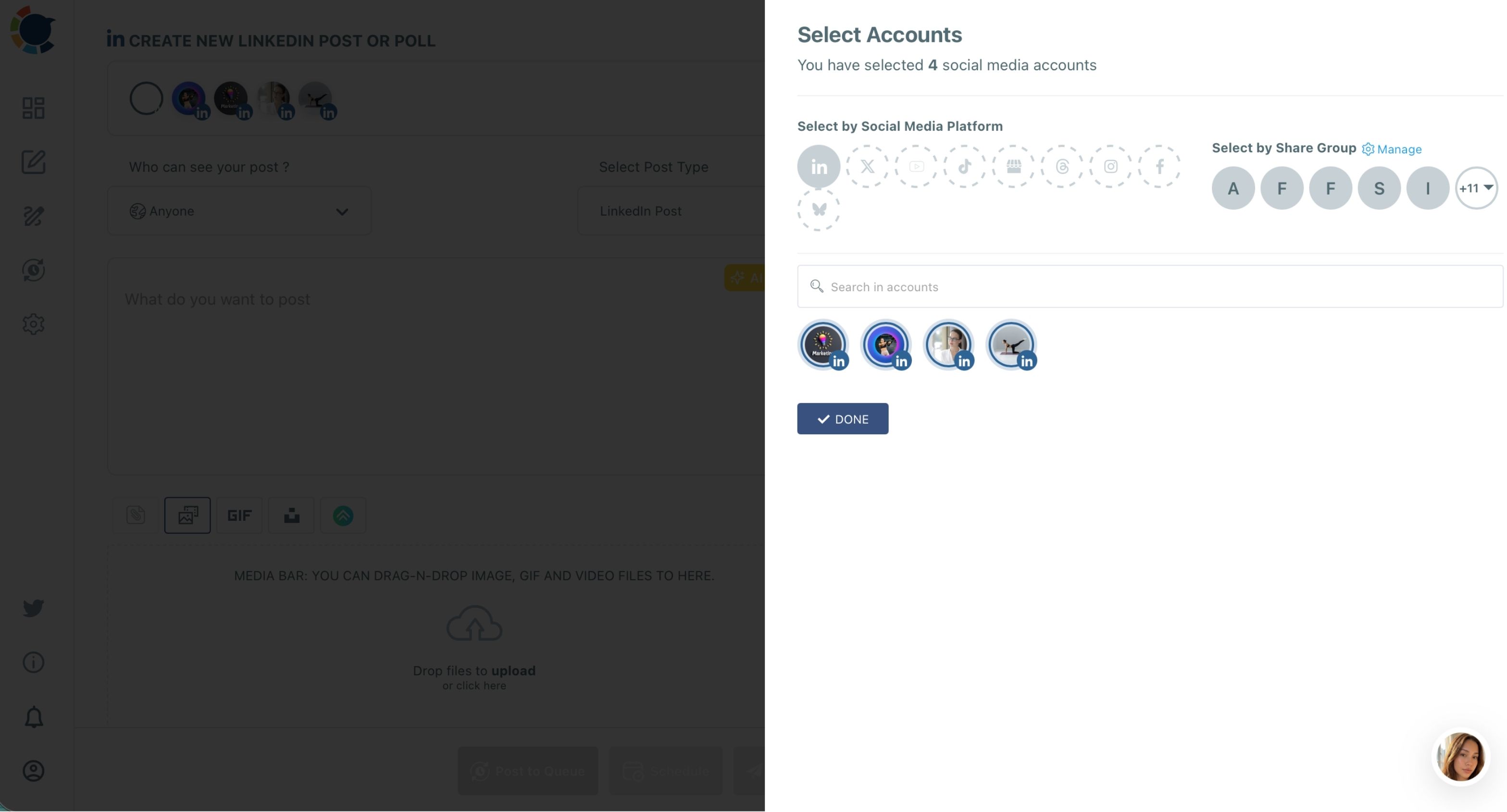
The facts get written once, in the Page version, and the partner versions only change the voice and the angle. Each send targets every selected account with the same content, so selecting one Profile per version is what keeps five partners from posting identical paragraphs.
A partner's version is usually shorter than the Page version. LinkedIn gives a post 1,300 characters in Circleboom, and a partner's personal take reads better at half that, with the article link in the First Comment so the post itself stays a story, not a press release.
For the Page version, I sometimes tag the firm or a co-author; the walkthrough on how to tag a company in LinkedIn posts covers that part.
Who approves a partner's LinkedIn post before it goes live?
At a law firm, nothing goes out under a partner's name without that partner seeing it. I send each partner a preview of his version during the week, and nothing is scheduled until he replies.
Inside Circleboom Publish, the approval layer is for the marketing team itself. Team Management gives each person one of two roles. An Admin posts directly and sees every account in the team. A User sees only the accounts assigned to them, and every post a User schedules waits in a Waiting for Approval view until an Admin approves it or rejects it with a comment.
Our marketing coordinator is a User assigned to the five partner Profiles and the Page. She drafts the partner versions, I approve them, and the Outbox shows which ones are scheduled, sent or still waiting. A rejected draft comes back with my comment, so the fix happens in the tool, not in an email thread.
For a firm, approval is the feature that makes delegation safe enough to hand off.
Timing each partner's LinkedIn post separately instead of all at 9 a.m.
The second lesson from the copy-paste month was timing. Post on multiple LinkedIn accounts at the same hour and the posts compete for the same overlapping connections.
The Schedule modal's "Pick your best post time" panel shows six suggested slots for the selected account, computed from that account's own connections and followers. A personal Profile and a Company Page are calculated independently.
Our litigation partner's network is active at different hours than our tax partner's. The best time to post on LinkedIn is different for each of them, and that is the point.
So the week looks like this: the Page on Monday, two partners on Tuesday at their own suggested times, two on Wednesday, one on Thursday. Nobody's post lands on top of a colleague's, and the article keeps resurfacing all week in slightly different words.
For weeks without a new article, I keep the Page active with RSS to LinkedIn. Every new post on the firm's blog goes to the Page on its own. Partners only get hand-written versions.
What changed on LinkedIn after three months of Friday sessions
The workload change is simple arithmetic. Done natively, six versions of one article means six separate log-ins, six uploads and five reminder emails. Done in Circleboom Publish, posting on multiple LinkedIn accounts is one composer session of about forty minutes, most of it spent writing, not switching accounts.
The visible change is that the partners started getting comments from people they had not heard from in years: former clients, in-house lawyers at companies we had pitched, a judge's former clerk now at a regulator. That is the network effect the Page alone could never reach.
I also stopped writing articles only for the Page. When I write now, I already know the article will go out as one firm post and five personal takes, so I plan the angles before I draft.
The full playbook for how to write and post articles on LinkedIn helped me shape the long version that everything else points back to.
One article became six posts, and the firm's voice finally sounded like six people instead of one logo.
There is a compounding benefit for the Page too. When partners point people to an article, some of those readers click through to the firm, and a current Page is what turns that visit into a follow.
The guide on how to share an article on a LinkedIn company Page explains how to post it there natively.
That is also why I now treat the Page as a channel of its own, with its own calendar, rather than an archive. The wider case for that is in LinkedIn for business.
The objection every partner raises about posting on LinkedIn, and my answer
The objection I hear most is, "If you are writing it, is it still my post?" It is a fair question from a lawyer, and the answer is yes, because of how the workflow is built.
The partner's Profile is connected only because the partner signed in and clicked Allow. The version is written in the partner's voice from the partner's own experience, and nothing is scheduled until the partner has read it. The marketing team does the drafting and the timing, the same way an assistant drafts a letter that the partner signs.
The other hesitation is effort. Partners assume it means more work for them.
In practice, posting on multiple LinkedIn accounts on their behalf asks for one ten-minute connection and one read-through per article, and they get a steady presence on LinkedIn they would never have time to build themselves.
If you run marketing for a firm with several partners and one Page, start with the next article you publish and post on multiple LinkedIn accounts with a version for every partner.
→ Post your next article on multiple LinkedIn accounts
Questions law firms ask about partner LinkedIn posting
Can a partner's post be limited to his or her connections?
Yes, for personal Profiles. The "Who Can See Your Post?" dropdown in Circleboom Publish offers Connections Only for Profiles, but it is disabled for Company Pages, because a Page has followers rather than connections.
Can a partner share a video clip of the article instead of text?
Yes. A LinkedIn Post in Circleboom Publish takes one video of up to 200 MB, so a partner can post a short clip with a personal caption. A longer conference recording needs a shorter or lower-resolution cut under that limit.
Can one long article become a carousel or a PDF post for the Page?
Yes. The LinkedIn composer in Circleboom Publish also offers Document Post for a PDF or slide deck and Carousel/Gallery Post for a set of slides. A long client alert can go out as a page-by-page document on the firm Page while partners post short personal takes.