
Various businesses and organizations are increasingly using social media sites to promote themselves and reach potential customers.
When we compare Facebook to other social media platforms in terms of advertising, it is the preferred medium for advertisers due to its success in offering the most accurate demographic data and the largest audience.
Facebook platform, which connects millions of users, offers a variety of alternative advertising spaces to meet advertisers' needs.
As a result, marketers may target broad audiences in a limited period with their chosen advertising campaign. Let's start by learning how to set up a Facebook business page.

From their marital status to their favorite restaurant, people share many details (including Instagram data) in real-time on Facebook.
As a result, small businesses should open a Facebook business account and use Facebook as part of their overall business strategy. When I say businesses, do not take it too much seriously. Every one can open up a Facebook Page to promote services and products, reach like-minded people, share own experiences and benefit from others. For example, you are an artist, a musician, and they you can create an artist page on Facebook and distribute your amateur music videos, Soundcloud links, etc. Do not think it is all about Facebook. You can help your other links to get SEO juice by promoting them on Facebook and getting likes and engagement. To learn more about how Facebook likes help SEO, read our detailed article here ⬇️
 Altug Altug
When you set up a Facebook business page, include your company logo, a catchy introduction letter, and a cover picture that reflects your products and services.
After that, you will begin to establish relationships with your current and future customers, boost brand awareness, and attract new customers.
How to set up a Facebook Business Page
Step 1: Ensure that you have an active Facebook account – for yourself.
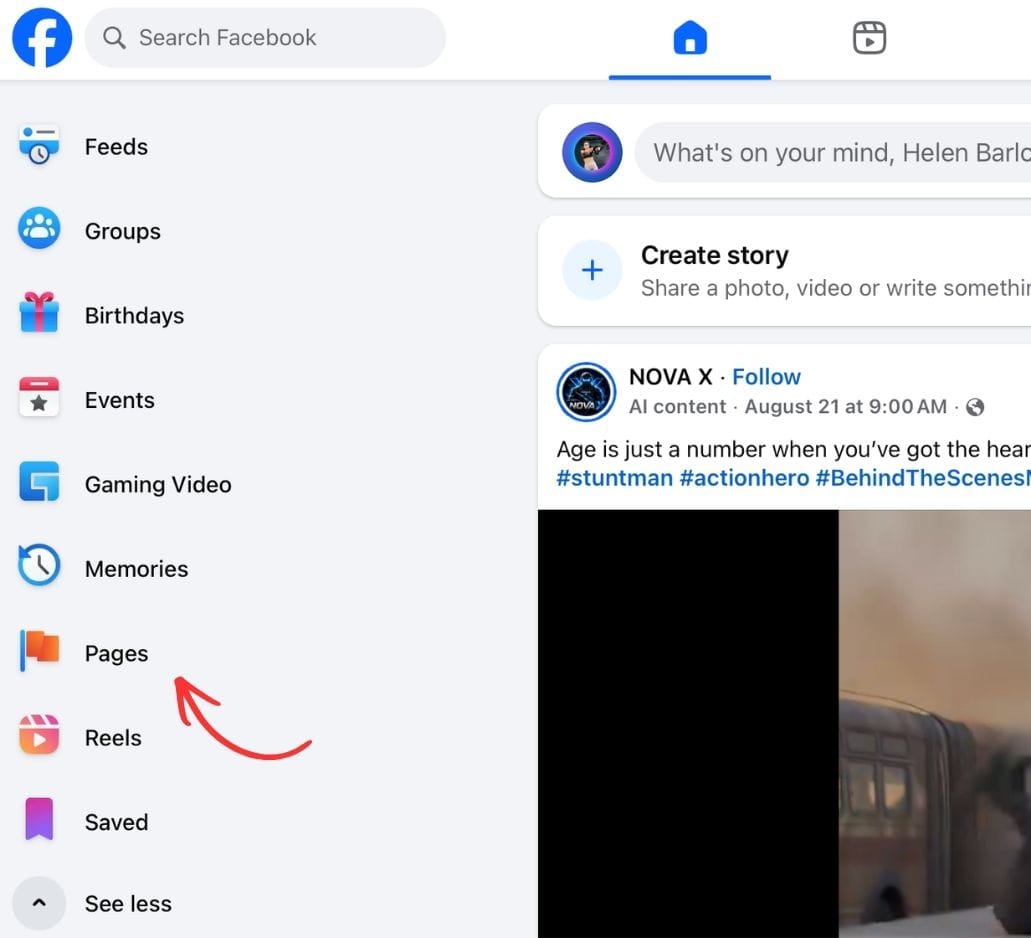
Then go to the left menu and find 'Pages' as pointed in the image below.
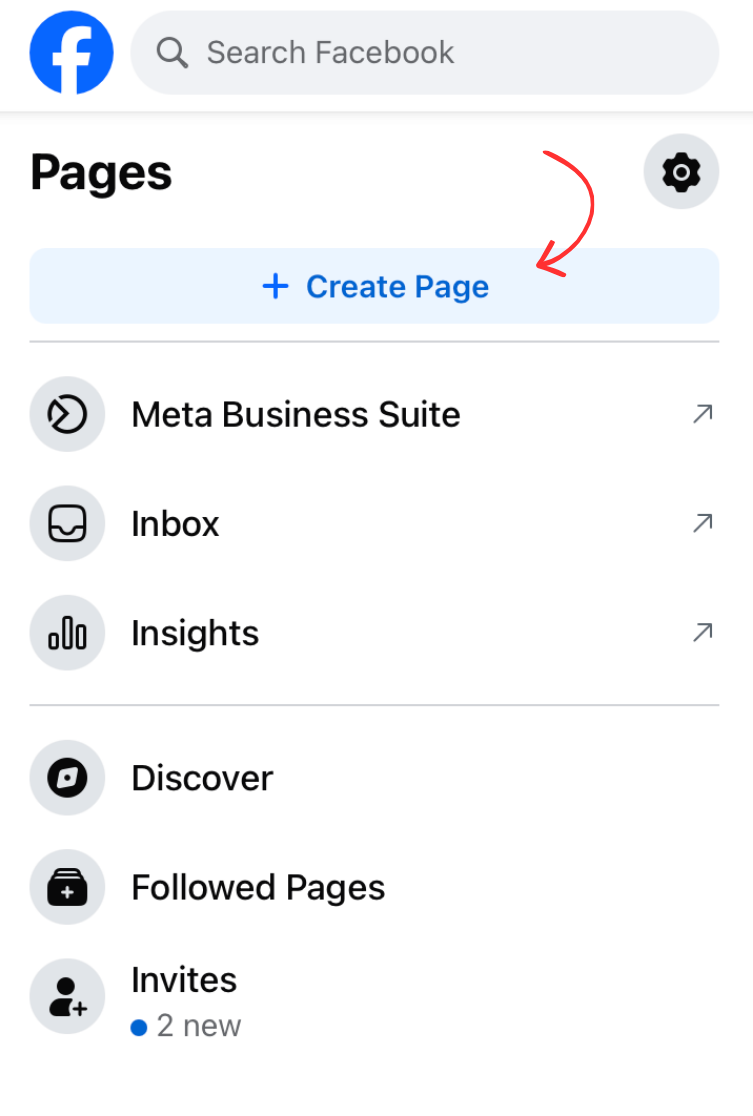
Step 2: Then find ' + Create Page' button on the top.
It will take you the next page where you type your page details.
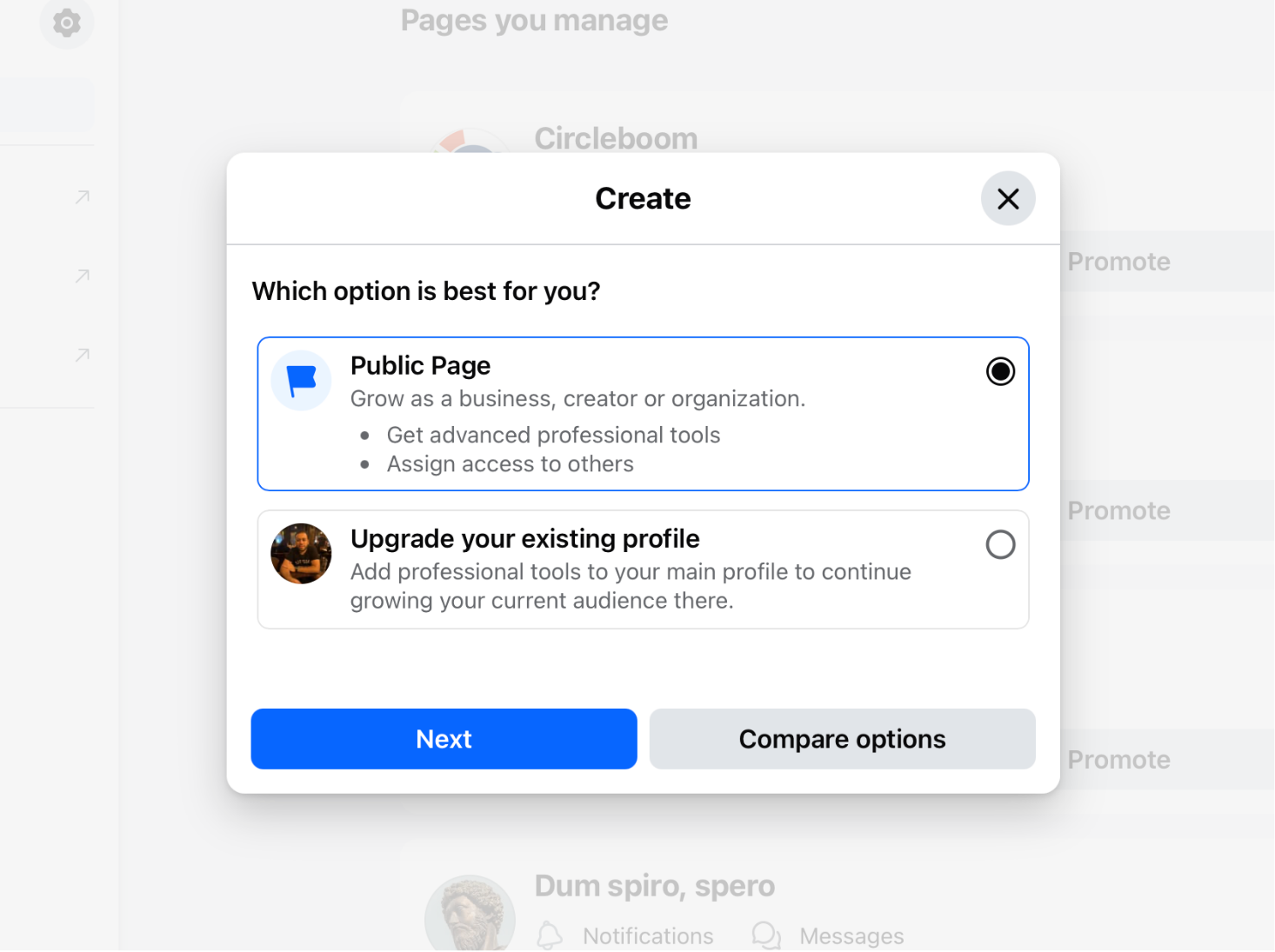
Then it will ask you whether you really create a page or upgrade your profile.
You will select create page.
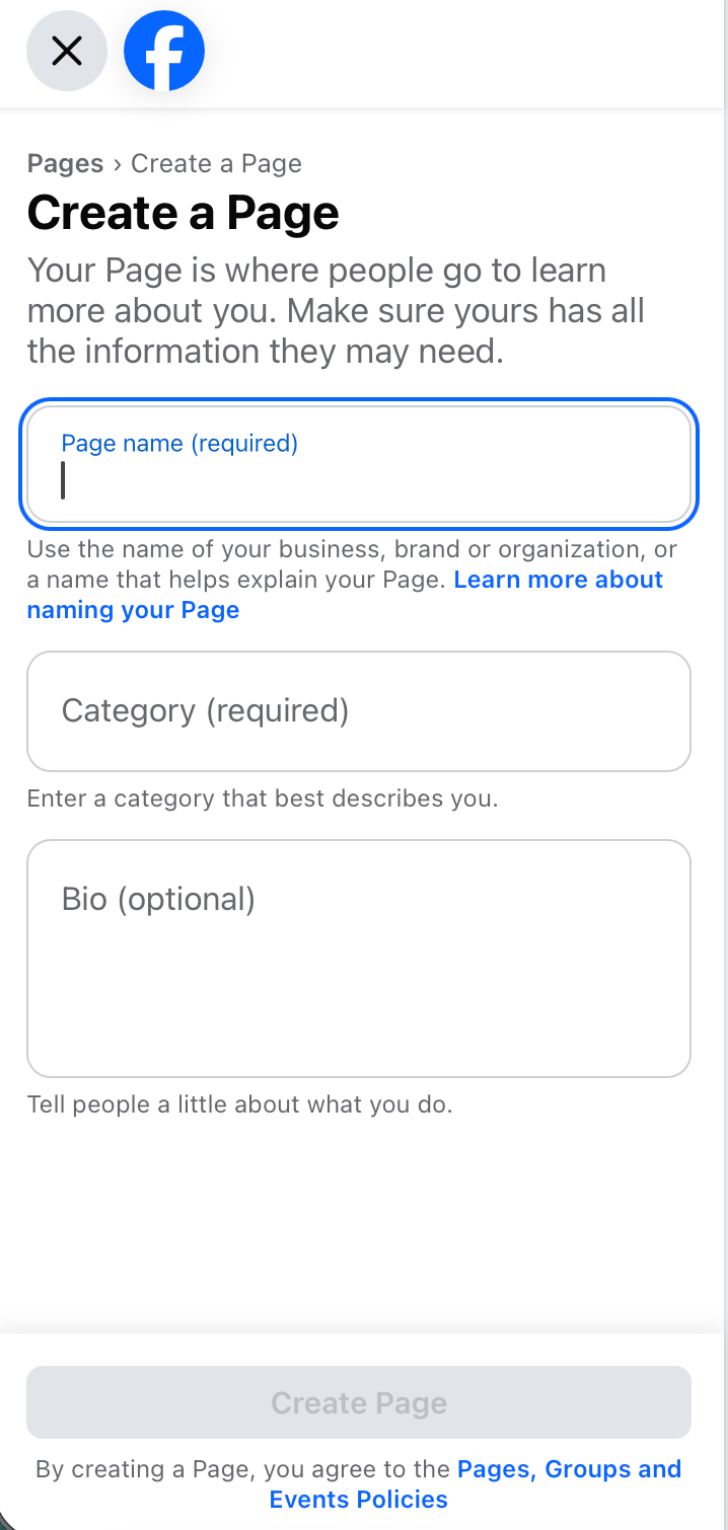
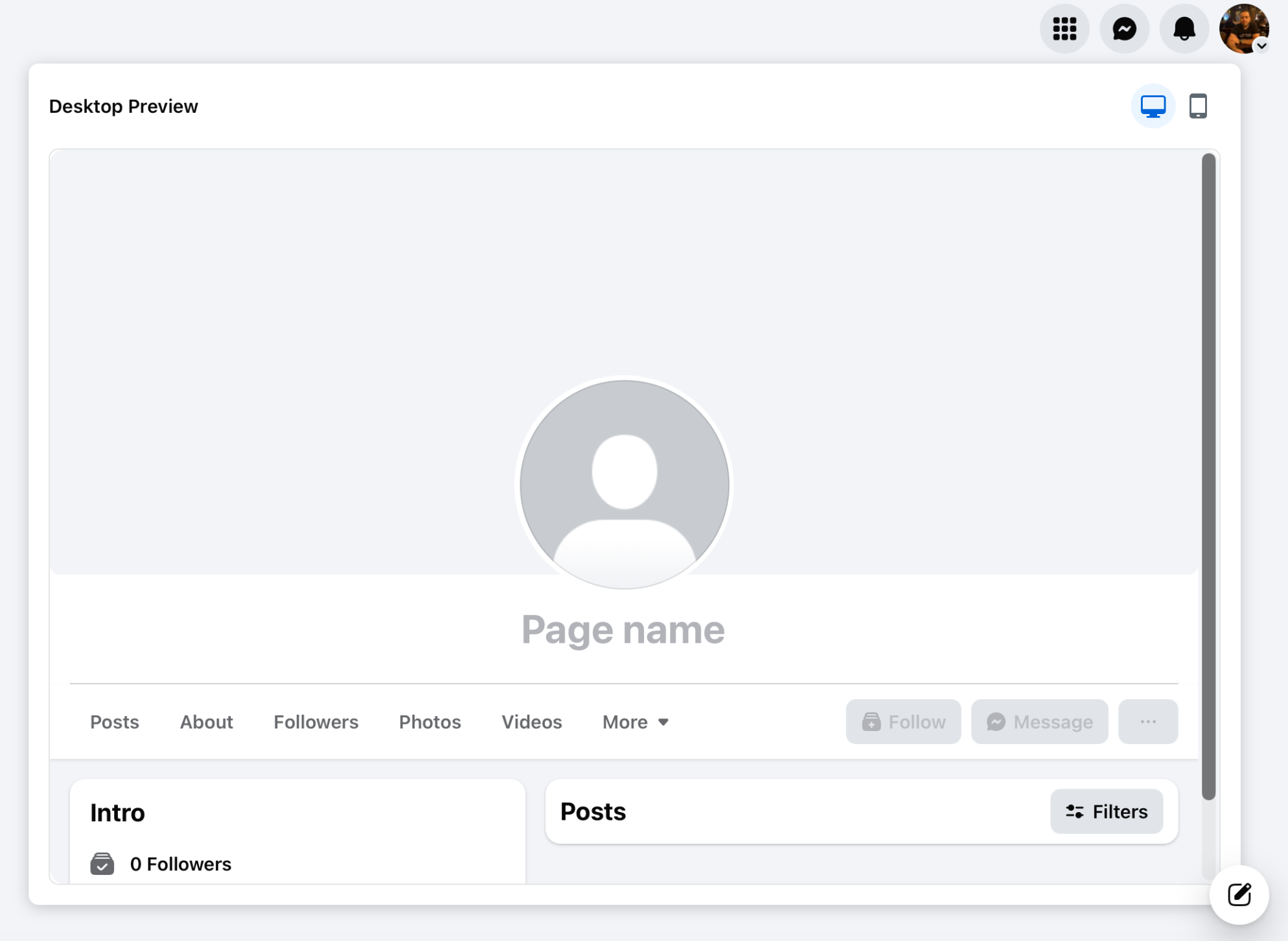
Step 3: Now, you need to enter the basic details of your Facebook Page.
Name, category, and bio.
Step 4: Next, you should get your photos.
Cover and Banner pictures for your Facebook Page.
 Isik Onal
Let's get straight to the point: content creation for Facebook Business Page
You must share high-quality content regularly so that your audience can connect and develop. Before you get too excited, make a plan for your content.
Create promotional posts that describe your business and its services or products.
By providing coupon codes, you can provide links to your website. In fact, considering Facebook marketing for small businesses, this strategy is very common. It will also help you to promote your Page and gain followers at first.
Inviting your friends to your Page is a great place to start. Your content will appear in their friend list feed as they like it.
You may think it is better giving Facebook Ads. Yes, it helps but in the long run, always rely on organic Facebook posts. Facebook Ads can bring some visitors to your page but if you use SEO, your Facebook posts will always beat ads in the game. For more details, you should check our blog page here ⬇️
 Altug Altug
How can you be successful on Facebook? Don't think it is a 'post it and wait' game. You should be consistent and keep posting regularly. I mean, not one post in a month. I mean posting everyday.
I hear you saying 'how can I find time and content to post every day?'. Do not worry. It is manageable and I can confirm it from my experience. This is ⬇️ my post calendar for August.
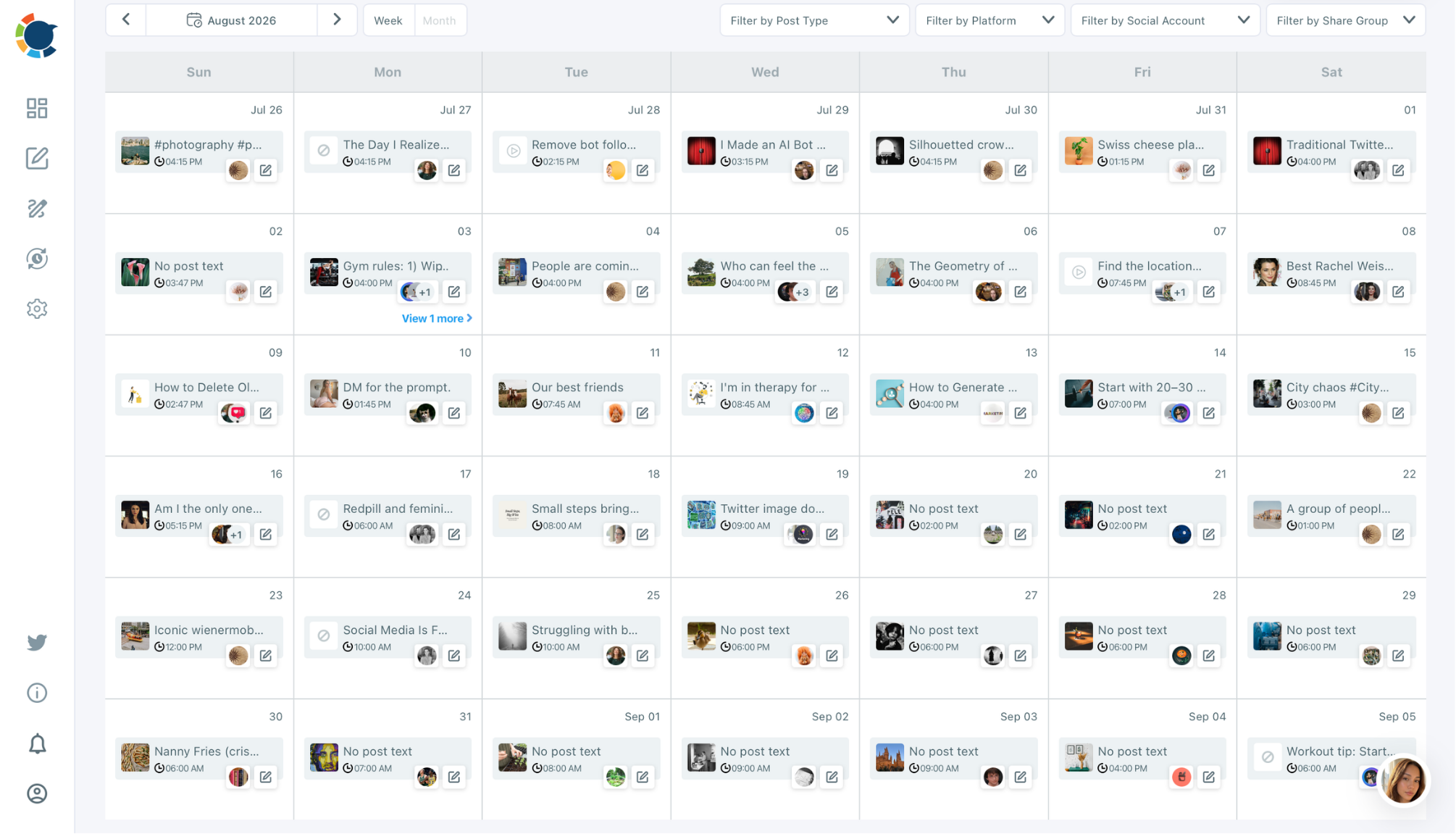
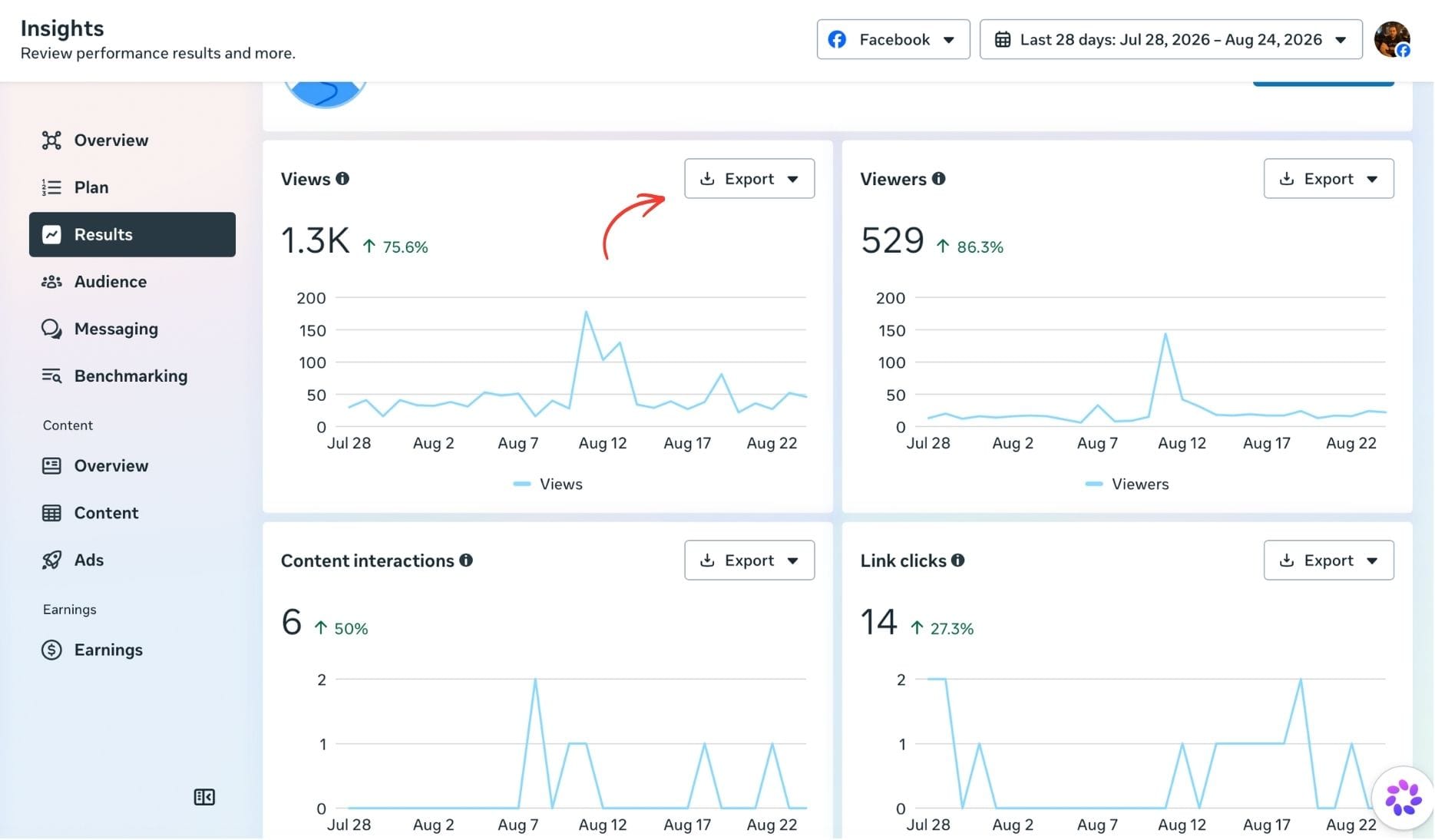
I created all of these in the last Sunday of July. It took 2-3 hours and finished in one sitting. Now, I don't even log into Facebook. At the end of the month, I will check the analytics and see which ones are successful and which ones are not.
 Altug Altug
How can I do all these? Simple because I use Circleboom Publish.
It gives me ability to plan, design, create, post, schedule, and automate my content on Facebook pages. Thanks to its Facebook scheduler, you can upload all your Facebook posts in advance. Thanks to its content curation and design tools: Canva, Unsplash and Giphy, you don't need to have your own material. You can find anything, really anything from gifs to images to emojis to sticker, and use them in your posts.
You don't need to write the text. AI Writer on Circleboom makes it for yourself. Just ask it to write anything about any topic. You can make it more punchier, funnier, add hashtags and everything can be done with AI integration of Circleboom.
If you say, I don't want to bother myself even with these, you can automate your posts with other sources. What do I mean? For example, I have a Facebook Page for gardening tips but I don't know anything about gardening. I DON'T EVEN HAVE A GARDEN! But, still, I generate posts about it! How?
I use www.gardenary.com as my source. I created RSS Feed of it. Then, I connected it to my Facebook Page through Circleboom. I set up 3 posts per day. Now, when something new published in gardenary.com, it will automatically be published in my Facebook page. Perfect, isn't it?
By the way, I don't use Circleboom for my only 1 Facebook page. I have 30 Facebook Pages and all of them are connected to Circleboom!
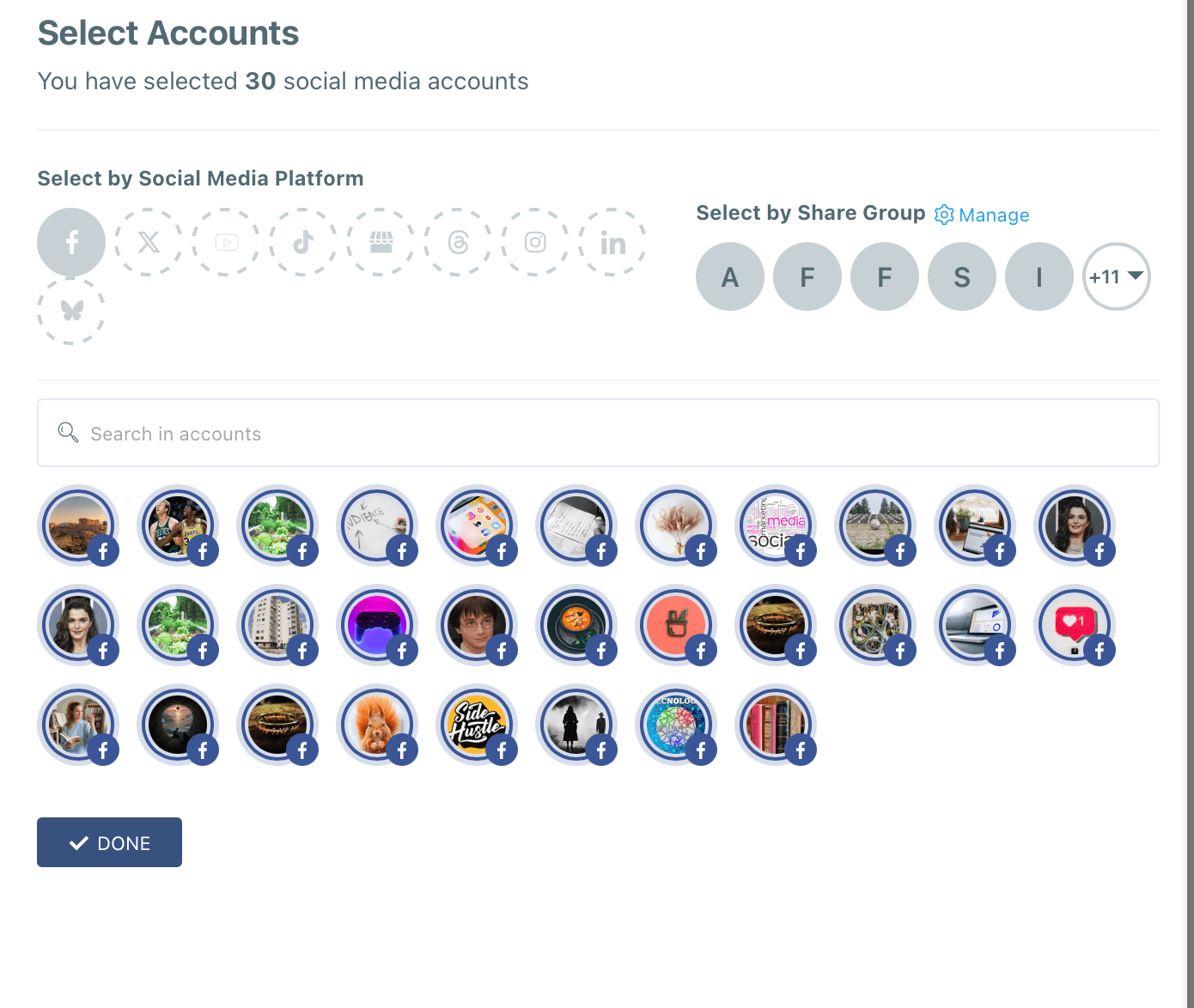
Yes, you can connect all your Facebook pages (along with your other social media accounts from other platforms: Twitter, Instagram, Pinterest, LinkedIn, Google Business Profile, Threads, Bluesky, TikTok, and YouTube) and manage multiple Facebook pages all together from the same place.
How to use Facebook Ads Manager
Facebook also provides paid advertising solutions to help you develop your Page and achieve specific objectives.
You can reach particular audiences using Facebook's advertisement tools. Your messages would reach the people who are most likely to communicate with them in this way.
11 objectives that Facebook Business Manager offers for a campaign:
- Brand awareness: Make the brand known to a new audience.
- Reach: Get your ad in front of as many people as possible in your target demographic.
- Traffic: Direct visitors to a particular website, app, or Facebook.
- Engagement: Reach a large audience to boost the number of post interactions or Page followers, etc.
- App installs: Convince people to download your app.
- Video views: Increase the number of people who watch your videos.
- Lead generation: it is the method of getting prospective clients into the sales funnel.
- Messages: Encourage customers to contact your company through Facebook Messenger.
- Conversions: Convince users to take a particular action on your website.
- Catalog sales: Link your Facebook ads to your product page to showcase audience the items they are most likely to purchase.
- Store traffic: Drive people to nearby brick-and-mortar shops.
Particularly, if you are an individual business owner, Facebook marketing for b2b or b2c campaigns will require paid ads.
Step 1: Now that you have a Facebook business page, you can go to the Facebook business manager (https://business.facebook.com/) and start your first advertisement.
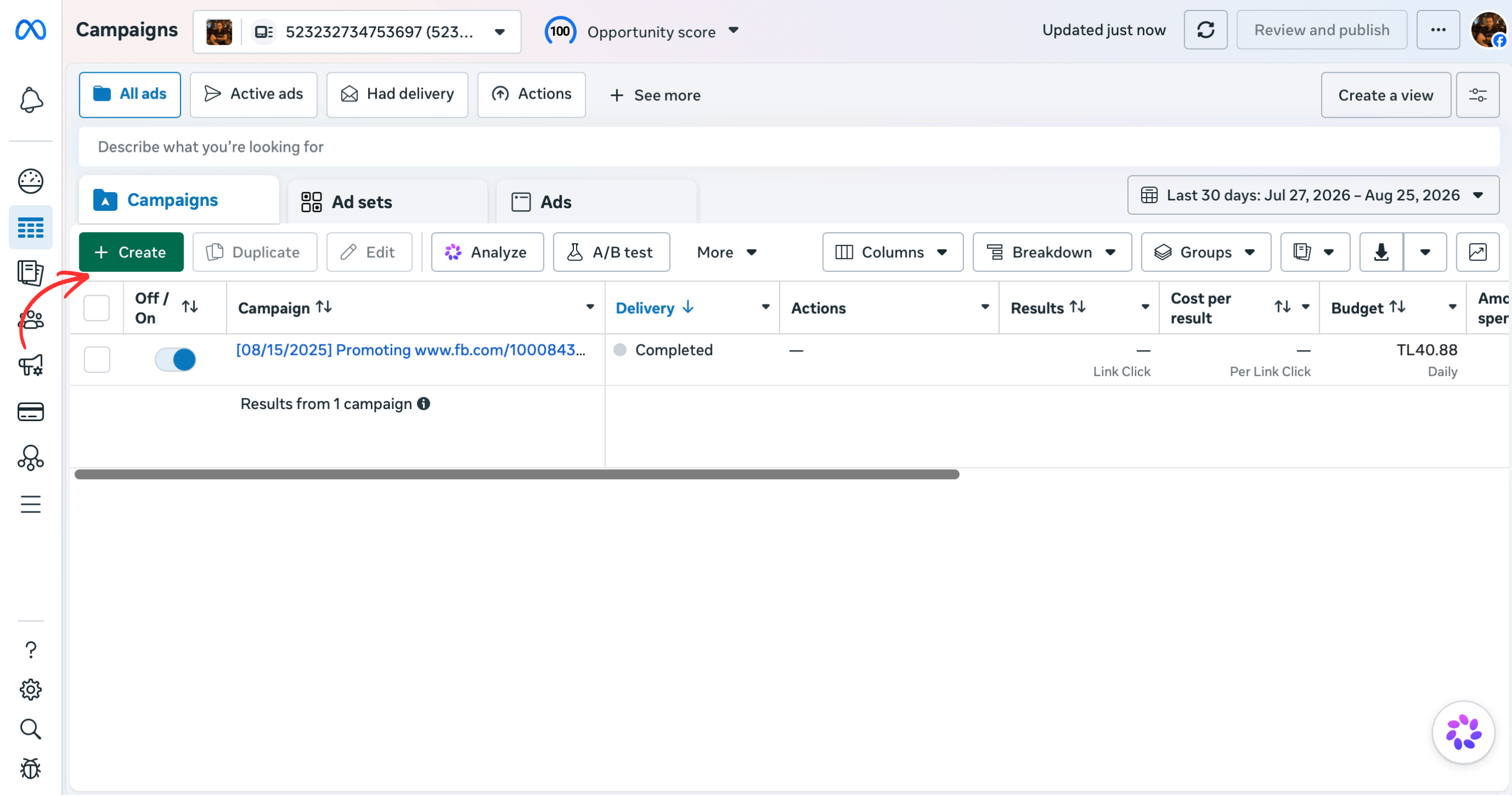
To begin creating a new Facebook ad campaign, go to Facebook Ads Manager, pick the Campaigns tab, and then press Create.
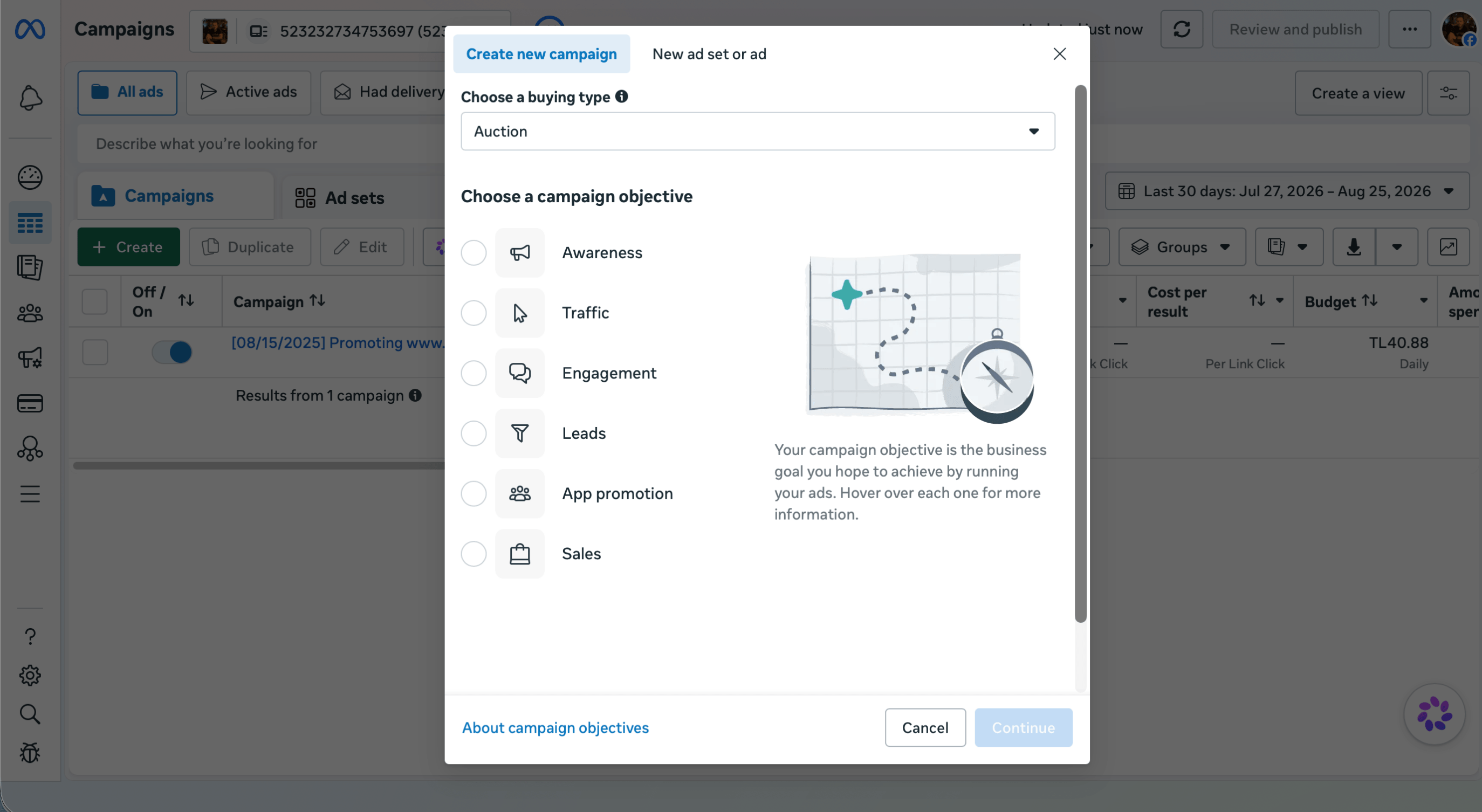
Step 2: First, choose a buying type.
After, you should pick the campaign objective: awareness, traffic, etc.
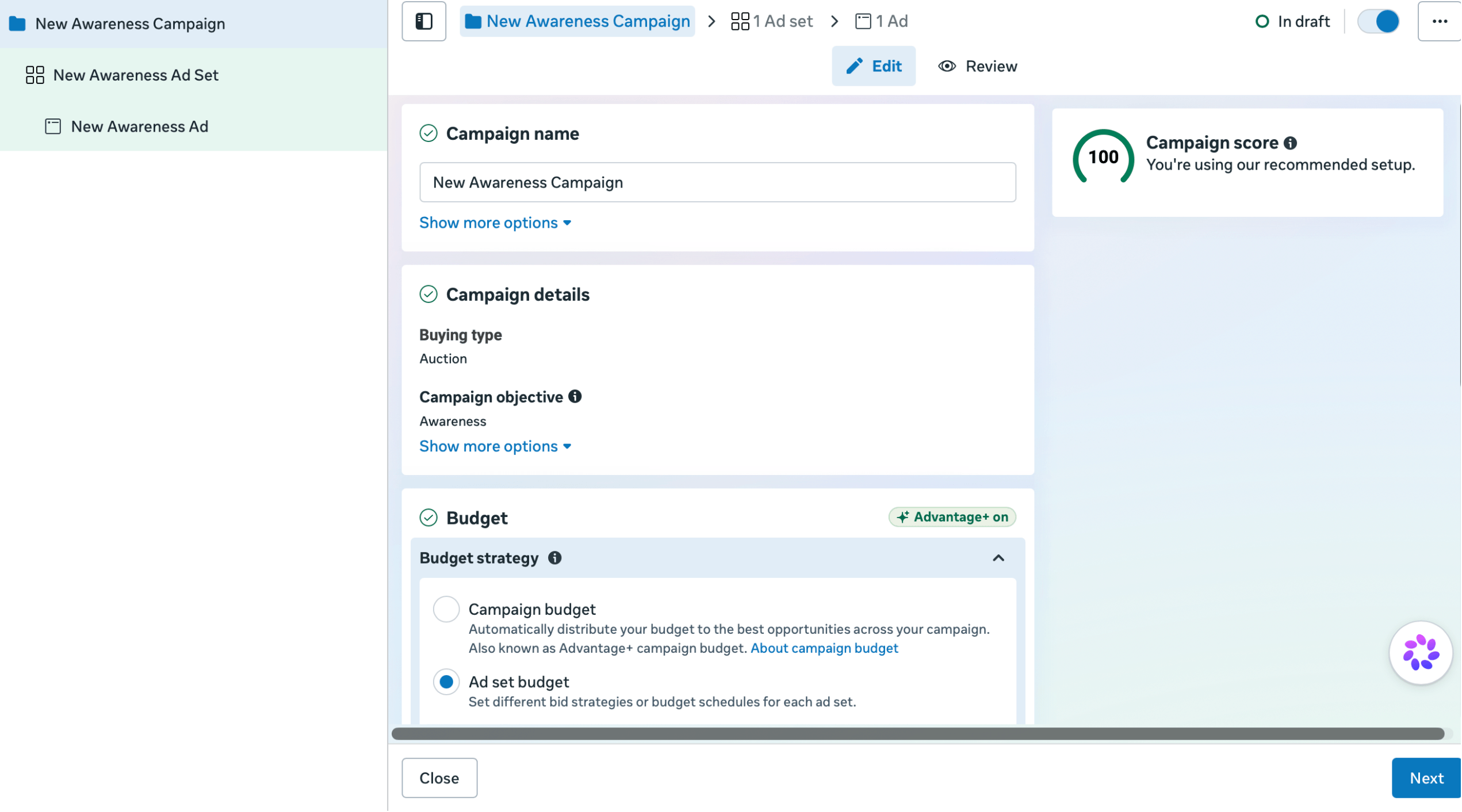
Step 3: Next, you should enter your campaign name and campaign budget.
You can also need other details like campaign frequency or A/B test.
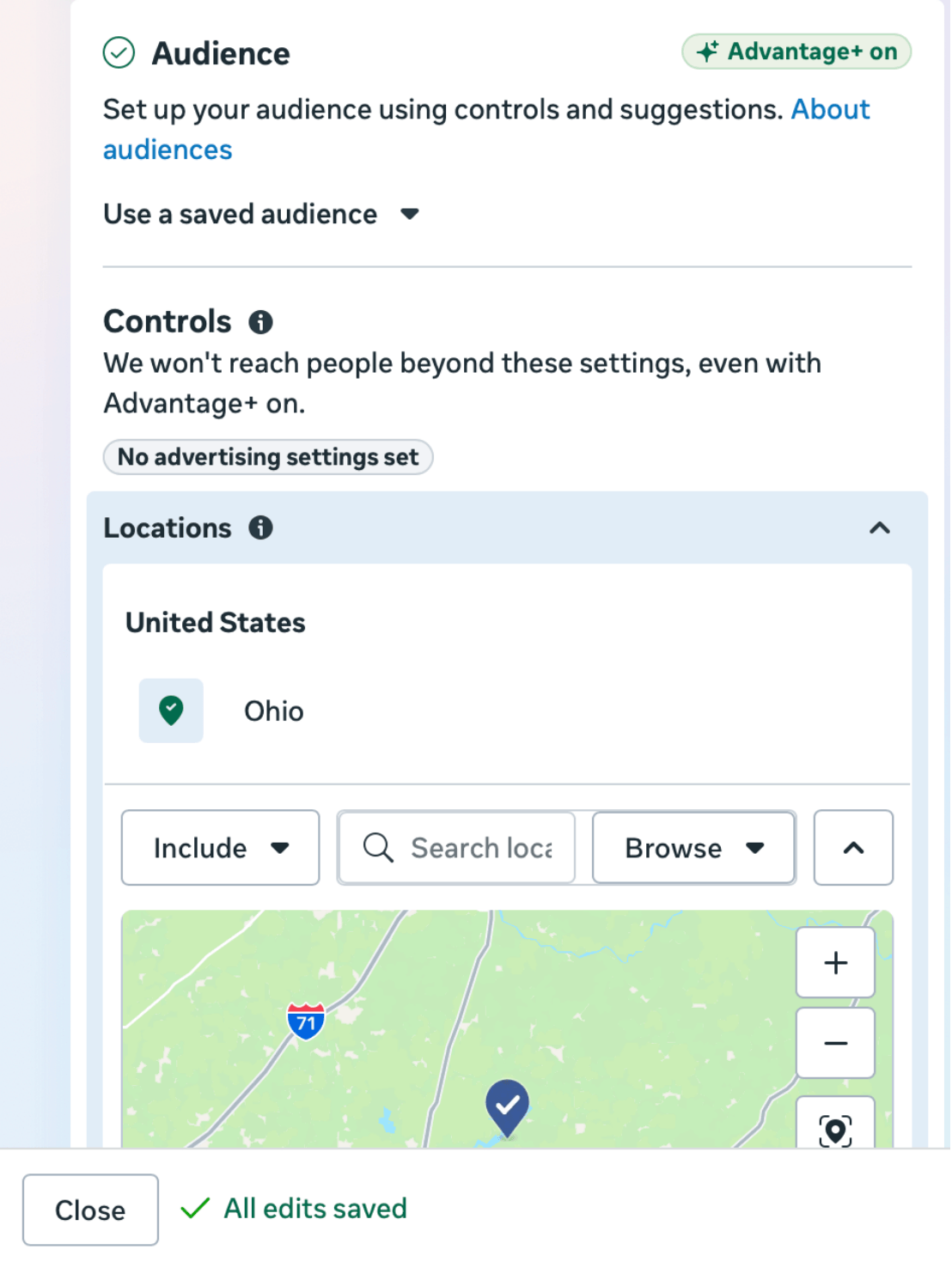
Step 4: Now it is time to select the target audience of the ad. It is the critical section in which you can make or break the deal. Start with your target place, age, gender, and language. It is worth noting that you can specify whether or not cities of a certain size should be included or excluded.
As you decide your options, keep a close eye on the target size graph on the right side of the screen, which gives you an idea of what level of audience your ad can reach.
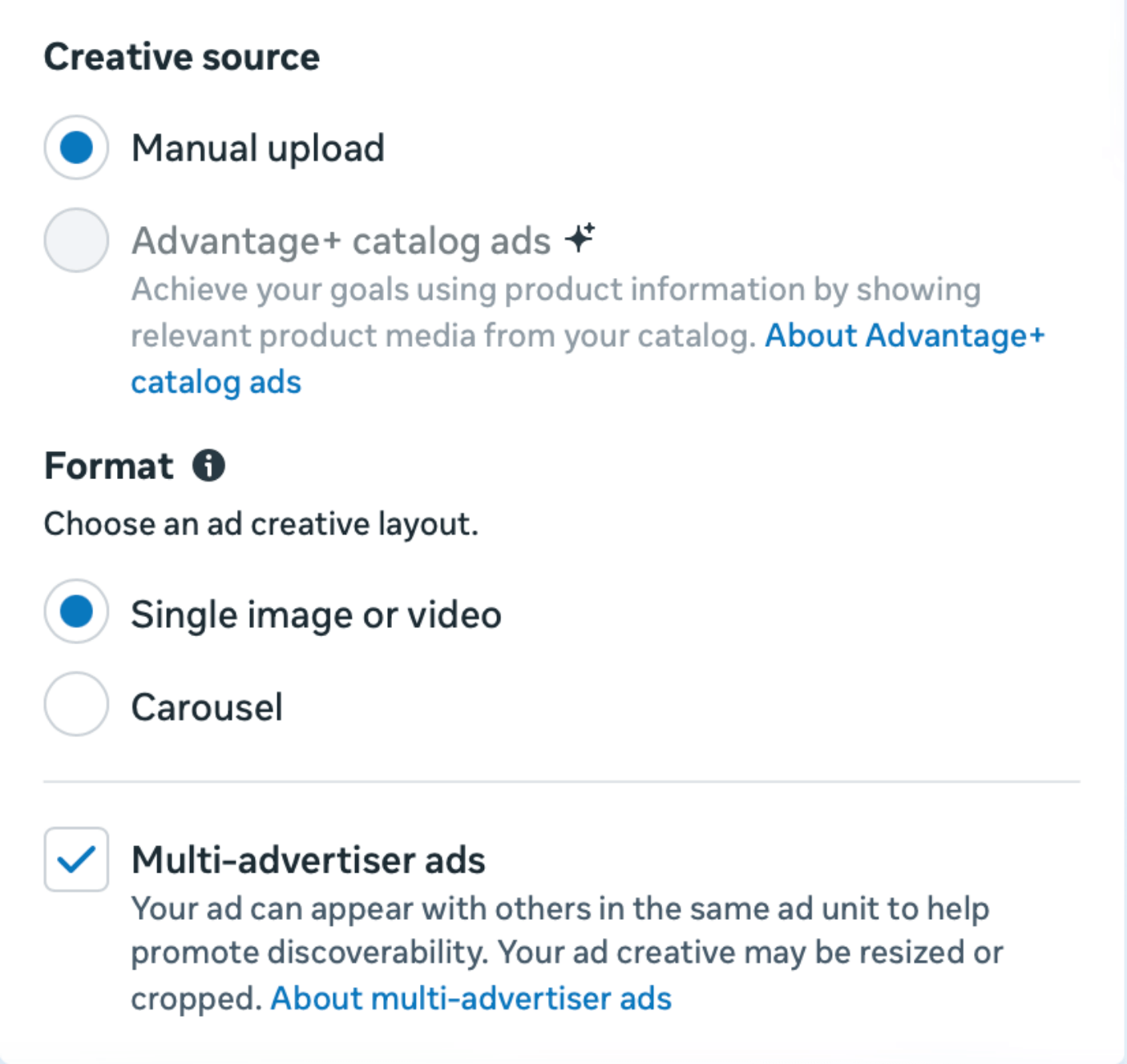
Step 5: Create your ad visuals.
Here you will add your images or videos for ads and also edit the text. And do not forget to preview the ads before publishing.
Facebook Marketing Tips For Small Business
Starting with steps of setting up a Facebook business page and then investing in Facebook paid ads is the main path many people follow for their Facebook marketing strategy for small businesses. Also, give in-app guidance, which can assist small businesses in efficiently navigating the process of setting up a Facebook business page and strategically investing in Facebook paid ads, enabling them to optimize their Facebook marketing strategy.
We provide some Facebook marketing tips for small businesses for the organic growth of the Facebook business page and the Facebook Ads' optimization.
Use Facebook Pixel to optimize your ads
This Facebook pixel is actually a code that can significantly affect your Facebook advertising campaigns.
After you've added the code to your website (it is simple, don't worry), you'll be able to monitor conversions and remarket to people who have looked at a product on your site.
Customizing Ad Copy
Images are especially important, but the ad's text is equally important for both the promoted or not promoted posts you share on the Page and the visuals you have prepared specifically for Facebook ads. Because even if the visual tries to explain everything, the user will search for a description, a call to action, and if he or she cannot find it, will continue to scroll or swipe.
For example, Facebook marketing for real estate can be different than companies that offer products to consume. Real estate agents' Facebook ad post can be a suggestion for decoration or a before and after photo / short video of a house that has been revamped and is for sale.
Another small business example is dentists. If you manage your own Facebook business manager as a private practice dentist, the content will play an overly critical role because you have to build trust with few resources. And in the health sector, advertising without being banned on Facebook can require a lot of information.
In the case of Facebook marketing for dentists, visuals or short videos or maybe slide shows explaining patients' testimonials, their treatment results can be the most effective marketing material.
Managing the exposure of ads
More exposures generally seem to lead to higher purchase decisions or intent. Because when people hear about a brand for the first time or are exposed to advertising for the first time, it would be against human psychology to behave.
Of course, this inference does not mean making people bored. There is a fine line in between. You can find the frequency and time frame that works best for you by testing both the ad's schedule and frequency.
Boost your Website Traffic with Business Page
Buyers who arrive at your website via Facebook are more likely to pay attention than random visitors as they are already know your company or product and were inspired to click a link.
With a Facebook Business Page, you can provide customer service
Customers can ask follow-up queries on your Facebook page, and your employees can respond.
This method is much more effective than making others answer the phone, and it helps other people to read frequently asked questions and responses without having to contact you one-on-one.
It is not as difficult as it seems to learn how to build a Facebook Business Page, familiarize yourself with paid advertising, and experiment with them.
All you need is to learn and understand what appeals to your target audience and use the right content and Facebook marketing strategies to catch their attention.