

The idea makes sense. You find an account in your niche that has clearly done the work of finding the right people to follow. Their following list is basically a curated directory of relevant accounts. Why start from scratch when someone has already built that list for you?
Twitter doesn't give you a clean way to access it. You can visit any public profile, click following, and scroll through the list, but you're looking at a partial view that never fully loads, with no way to sort, filter, or act on what you see.
Circleboom Twitter retrieves the complete following list of any public account, displays every account in a structured table with full profile data, and lets you mass follow them directly from the results.
Can you copy someone's following list on Twitter?
Not through Twitter's native tools. Twitter shows a partial, unfiltered following list with no actions available.
With Circleboom Twitter's Adcanve Search Tool, you can retrieve the complete following list of any public account, apply filters to narrow it down, mass follow selected accounts.
 infocircleboom.com
All follow actions run through X's official API with built-in safety limits so your account stays protected. You can also export the entire list as a CSV if you want to analyze or use the data elsewhere.
What Is Circleboom Twitter?
Circleboom is an Official X Enterprise Developer, which means every action it performs goes through X's official APIs. Follow actions are processed with built-in rate controls that respect platform limits automatically. No shortcuts, no workarounds, no risk of platform penalties.

Here's what Circleboom Twitter gives you for following list access and growth:
- Retrieve the complete following list of any public Twitter account
- View full profile data for every account including bio, follower count, and activity level
- Apply filters to narrow the list before taking any action
- Mass follow selected accounts safely within X's official API rate limits
- Export the full following list as a CSV for external analysis or outreach
How to Copy Someone's Following List on Twitter with Circleboom Twitter
Step #1: Log in to Circleboom Twitter.
If you don't have a Circleboom Twitter account, you can quickly sign up by clicking "Create an account."

Step #2: Find the "Advance X Search." tool on the left-hand menu and navigate over it.
From the dropdown menu, select "Followers / Following Search."

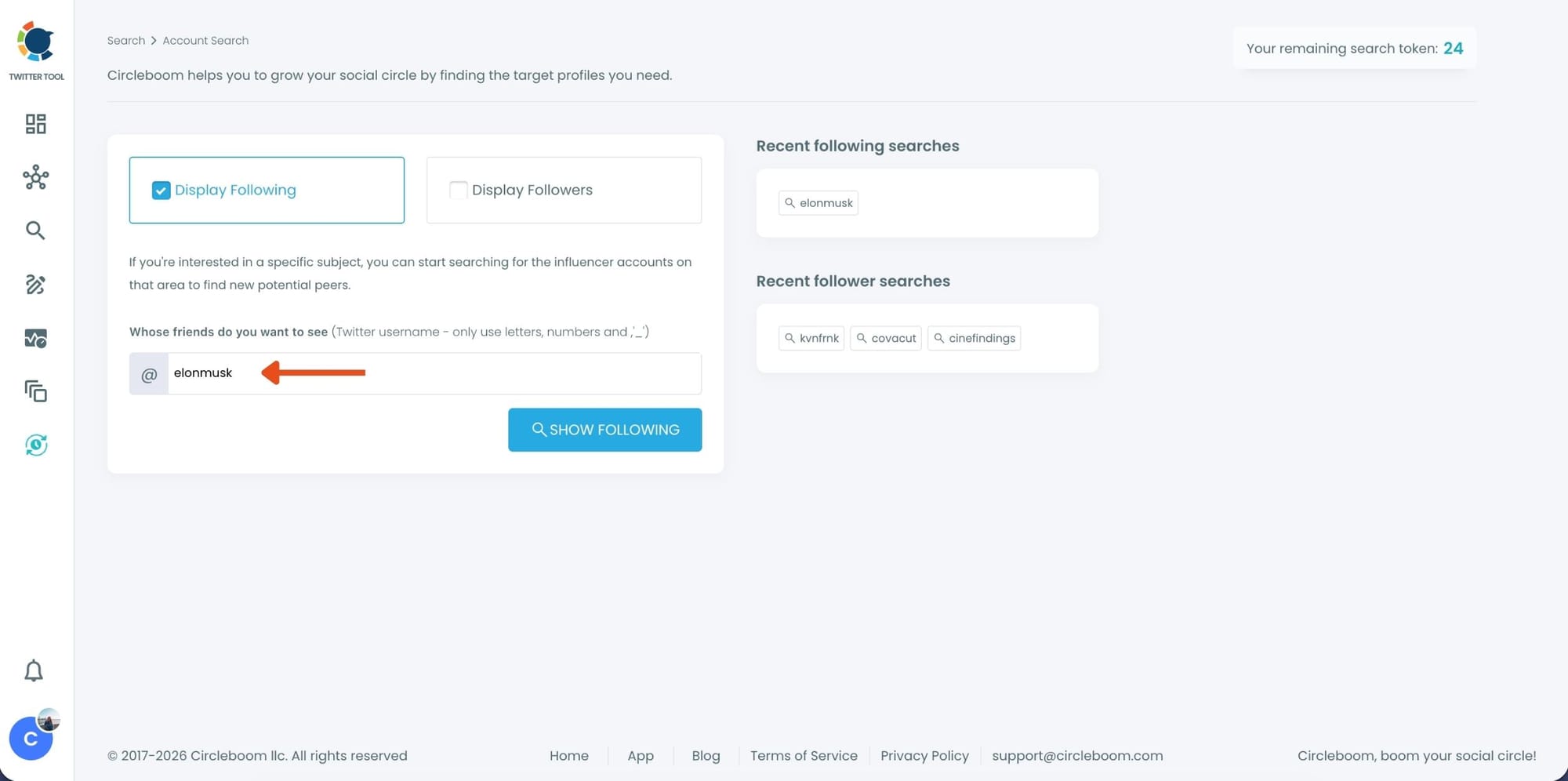
Step #3: If you want to search someone's Twitter followings, click the "Display Followings" option. Or, you can select "Display Followers" to search to see all of someone's followers on Twitter.
Then, you need to type the Twitter account's username in the search bar.
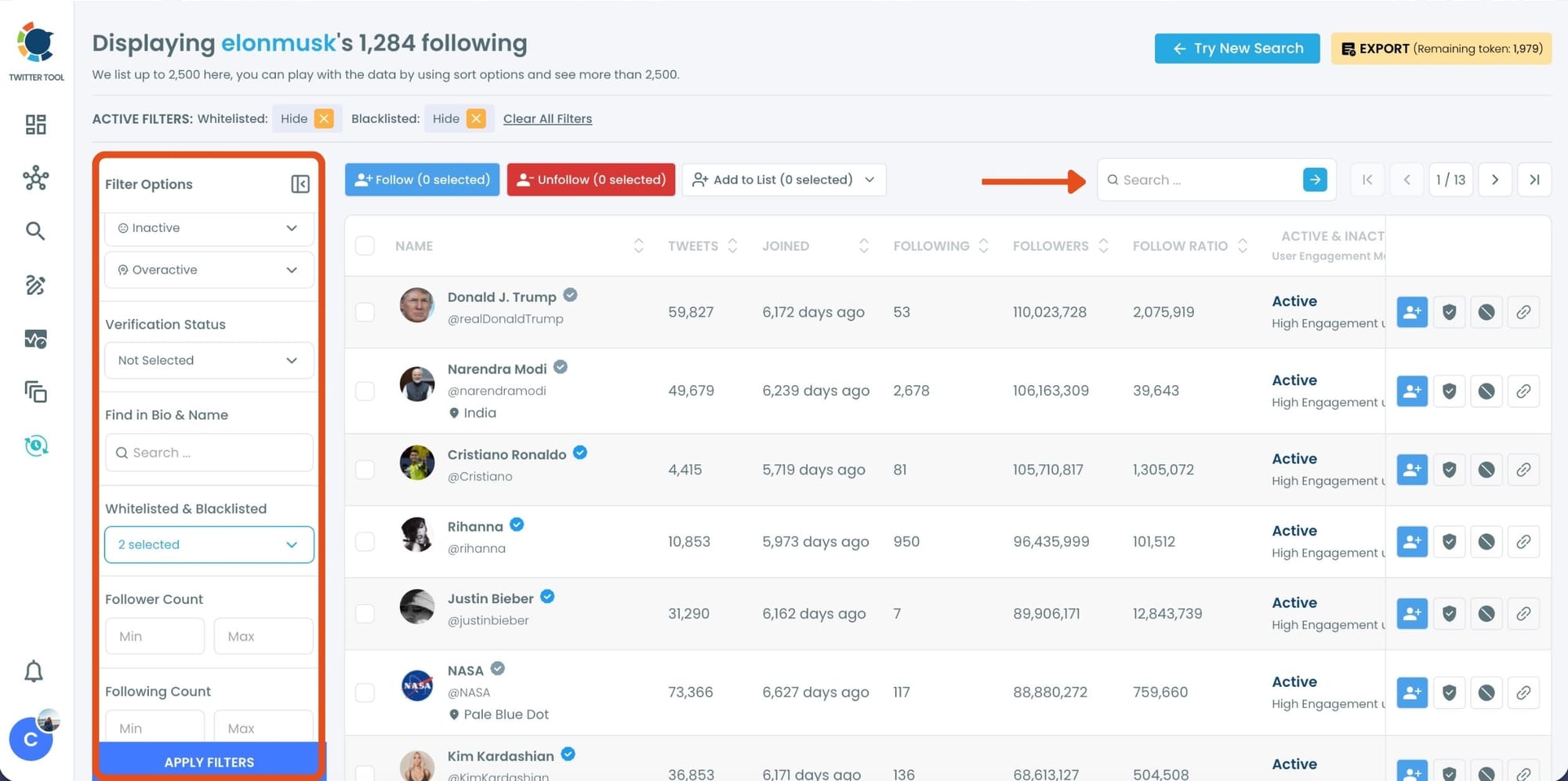
Step #4: A Following list of targeted Twitter profiles will be listed.
You can check these accounts. and if you wish you can add them to Twitter lists where you can see the content of X accounts without really following them!
Or mass follow/unfollow with one click!
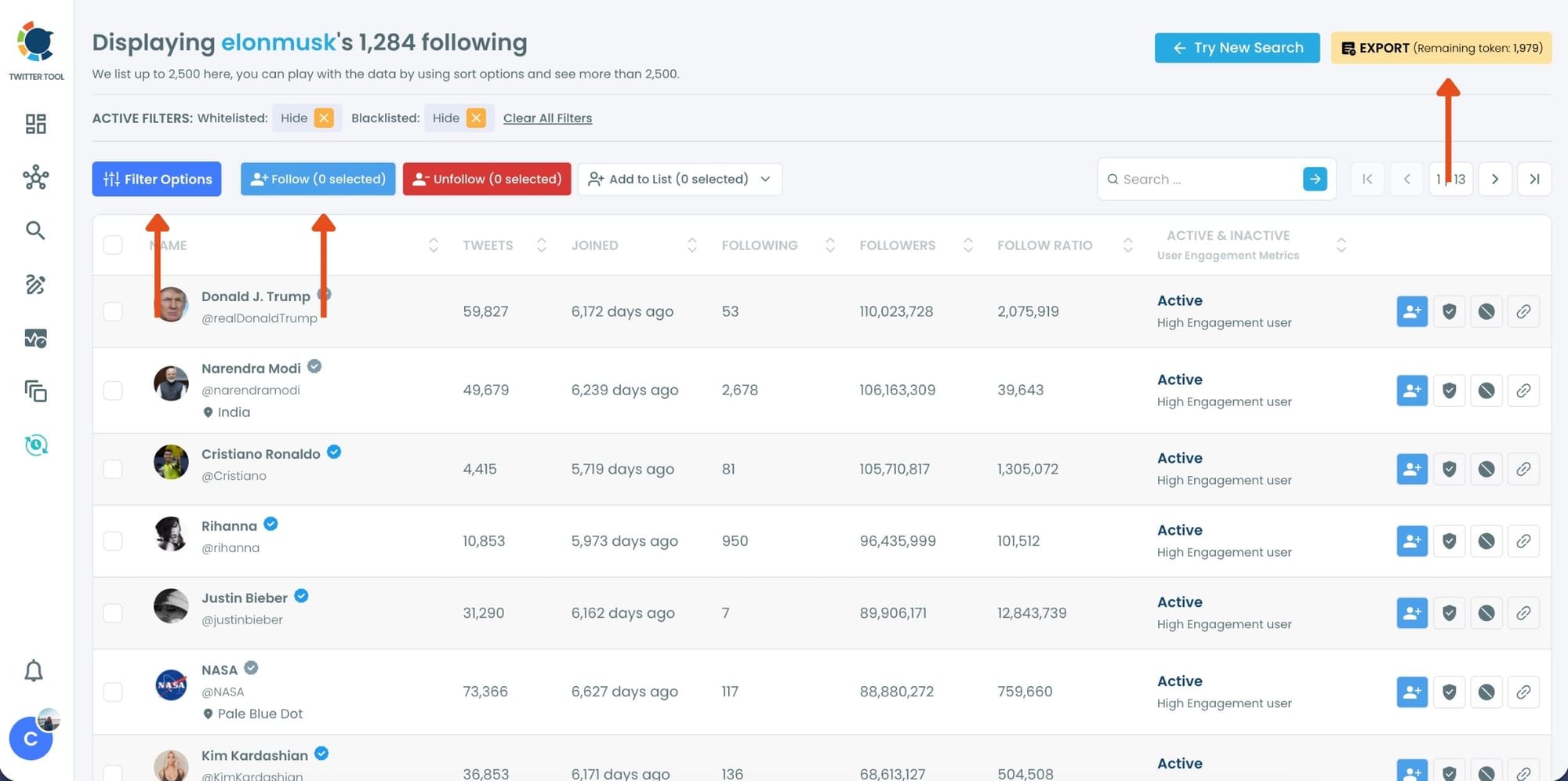
Step #5: You can search for a specific keyword to narrow down the list using the keyword search bar as the lists are ready.
Circleboom also provides users with advanced search filter options to search someone's Twitter followers without eggheads, inactives, etc.
If you want to enjoy Circleboom Twitter services on the go, you can download it iOS app below:

If you don't have an iOS device, no worries! Circleboom Twitter is working great on mobile browsers for Android users! Just have a try. You won't regret it!
If you need a more detailed guide, you can watch our video:
What Twitter Actually Shows You
When you click the following count on any public Twitter profile, you get a scrollable list. It loads in batches, it never fully completes for larger accounts, and there's nothing you can do with what you see. No sorting by follower count. No filtering by activity. No way to follow multiple accounts from that view. No export.
For accounts following a few hundred people, you can manually scroll through and note who's interesting. For accounts following a few thousand, that's not realistic. And for any size, the result of all that scrolling is still just a list of names you have to act on one by one.
📌 Circleboom Twitter retrieves the complete following list through X's official API, not from the scrollable interface. This means you get the full dataset regardless of how many accounts are in it, displayed in a structured table with every data point you need to make decisions.
The Safe Way to Mass Follow
The follow actions in Circleboom Twitter are processed with the same safety controls that X uses to define legitimate follow behavior. This is worth understanding because mass following done wrong gets accounts flagged or restricted.
Circleboom follows at a controlled pace, respecting X's rate limits automatically. The recommended safe batch is around 40 to 50 accounts at a time. The system pauses if limits are approached and resumes when it's safe to continue. You don't need to monitor it or manually space out the actions.
This matters because the goal isn't just to follow as many accounts as possible. It's to follow relevant accounts in a way that looks natural to X's systems and builds a real network over time. Aggressive bulk following in a short window is exactly the behavior that triggers restrictions. Circleboom's rate-controlled approach avoids that entirely.
⚠️ Circleboom does not bypass Twitter's limits. All follow actions fully comply with X's API rules. If you reach a daily limit, remaining follows are paused and can continue the next session. No actions are lost.
Why Export the Following List Too
Mass following is one use of the data. Exporting is another, and sometimes it's the more useful one.
For research and analysis. A competitor's following list tells you something about the accounts they consider worth paying attention to. Exported as a CSV, that list becomes a dataset you can sort, filter, and analyze outside Circleboom for strategic insights.
For outreach workflows. If you want to reach out to accounts in a specific niche, starting from a curated following list of a well-connected account in that space gives you a pre-filtered starting point. Export the list, bring it into your outreach tool of choice, and work from there.
For building Twitter Lists. Rather than following every account, you might want to add them to a Twitter List first to monitor their content before committing to a follow. Exporting the following list and then using Circleboom Twitter's Add to Twitter Lists feature gives you that option.
As a backup before any action. Exporting before you follow means you have the full original dataset regardless of what filters you applied during the follow workflow. You can always go back to the raw list.
Frequently Asked Questions
Can you copy someone's following list on Twitter?
Not natively. Twitter shows a partial, unloaded view of any following list with no actions available on it. Circleboom Twitter retrieves the complete following list of any public account and lets you mass follow selected accounts or export the full list as a CSV.
Is mass following from someone else's following list safe?
Yes, when done through Circleboom Twitter. All follow actions are processed through X's official API with built-in rate controls. Circleboom follows at a safe pace, pauses automatically when limits are approached, and resumes without losing queued actions. It does not bypass any platform rules.
How many accounts can I follow at once?
The recommended safe batch size is around 40 to 50 accounts at a time. Circleboom applies this automatically. If you reach X's daily follow limit, remaining actions are paused and can continue the next day.
Can I filter the following list before mass following?
Yes. Before taking any action, you can apply filters to the retrieved following list, including follower count, account age, activity level, and quality signals. This lets you narrow the list to the accounts most worth following rather than acting on the entire list indiscriminately.
Can I export the following list without following anyone?
Yes. Export and follow are completely separate actions. You can retrieve a following list, export it as a CSV, and do nothing else. The export is read-only and does not affect your account or theirs in any way.
Does this work on private accounts?
No. Private accounts have protected following lists that are not accessible through X's public API. Circleboom Twitter can only retrieve and act on following lists from public accounts.
Can I see the full following list or just part of it?
Circleboom Twitter retrieves the complete following list through X's official API, not from the on-screen interface. This means the full dataset is available regardless of account size, unlike the partial view Twitter shows in the app.
Final Thoughts
Someone's following list is one of the most useful signals on Twitter. It shows you exactly who they decided was worth paying attention to in their niche.
Accessing that list, filtering it, following the relevant accounts safely, and exporting the data for further use is exactly what Circleboom Twitter makes possible.
Copy someone's following list on Twitter and mass follow safely with Circleboom Twitter.
infocircleboom.com





