
To hide your address on Google My Business, turn off "Show business address to customers" in your Google Business Profile and list a service area instead, so the profile shows the area rather than the street. What keeps it findable afterwards is the category you choose and the posts you publish.
What this answer covers.
• Hiding the address is a Google setting: switch off the address and add the areas you serve.
• With the address hidden, the listing shows only your service area and still competes in local results.
• Circleboom Publish keeps that listing active by scheduling Standard, Event and Offer posts to Google Business Profile.
Built on Circleboom Publish's Google Business Profile post scheduler. Post to a hidden-address listing every week with scheduled Google Business Profile posts.
What hiding the address on Google My Business actually does
Hiding the address removes your street from the public listing and replaces it with the service area you define. Google's address help page says that once the address is hidden, the Business Profile shows only the service area. The rest of the listing, such as the name, category, phone number, reviews and posts, stays in place.
The option exists for one kind of business. Google's Business Profile overview for service businesses defines a service-area business as one that visits or delivers to customers directly but does not serve them at its address.
A hybrid business, which serves customers at its address and also travels to them, keeps the address and adds a service area.
The setup itself takes two moves in Google:
- Turn off "Show business address to customers" in the profile.
- Add up to 20 service areas by city, postal code or another named area, never as a radius.
Google also says the whole area should stay within about 2 hours of driving from your base.
If the listing does not exist yet, the first job is to add your business to Google and claim it. None of these settings appear until there is a profile to edit.
How long the change takes and what searchers see
Google says profile changes usually show in about 10 minutes, though some take up to 30 days, and approved service area edits can take up to 48 hours. During that window the old details may still appear, so avoid toggling the setting back and forth.
Once the change is live, a searcher sees the business name, the service area, the category, the phone number and whatever the profile has posted. The pin on a street is gone, and the reasons to call stay.
A business nobody visits still belongs on Google Maps, because Maps is where people choose a plumber, a cleaner or an accountant, not only where they drive.
Circleboom Publish is the Google Business Profile post scheduler that writes, schedules and queues posts for a listing, whether or not its address is visible.
It does not change the address, the service area or any other profile setting; those stay in Google's dashboard.
The posting half of hiding your address on Google My Business runs through Circleboom Publish's Google Business Profile manager.
Does hiding your address hurt your local ranking on Google?
Google's ranking help does not mention a penalty for a hidden address. Its tips to improve your local ranking name three factors:
- Relevance: how well a Business Profile matches what someone is searching for.
- Distance: how far each business is from the person searching.
- Prominence: how well-known a business is.
The same page says there is no way to request or pay for a better local ranking, and that businesses with complete and accurate information are more likely to show up in local results.
Read those three factors with the address gone. Distance is out of your hands, and Google says no one can pay their way past it. Prominence builds slowly through reviews and mentions.
That leaves relevance as the factor a service-area owner can move this week.
"Complete and accurate" has two parts in practice. The first is done once inside Google Business Profile: category, hours, phone number, description, logo and photos.
The second never ends, and it is the part most listings skip: posting, so the profile keeps showing an open, active business.
Circleboom Publish helps a service-area business stay relevant on Google by publishing a steady run of Google Business Profile posts about the work it does.
That is the lever this article keeps returning to. It is the only one that responds to effort every single week.
On your Google listing, category and posts now carry the relevance your address used to
For a listing with no visible street, the category and the posts do the explaining that an address once did. A storefront address tells Google and searchers something concrete: there is a place, on a street, in a neighbourhood.
Take it away and two things are left to say what the business is and what it is for.
The first is the category. Category and subcategories matter far more than an exact-match keyword in the business name. Search "pub London" on Google Maps and only one top result actually has "pub" in its name; the rest rank on what they are, not on what they are called.
That is why renaming a business "Best Plumber Leeds" is a weaker move than picking the right primary category and the subcategories that match each service.
The category is chosen inside Google Business Profile, not in any posting tool. Before picking, scan the complete list of Google Business Profile categories for the closest primary category and the subcategories that match each service you offer.
The second is the posts. A category is set once and rarely changes. Posts add new, specific words every week: the job, the problem, the town, the season.
The two work best when they echo each other. If a subcategory names a service, write posts about that service. If the service area lists five towns, mention them where they fit naturally in the posts.
A gutter-cleaning post that names the towns you cover tells Google what you do and where you do it, which is the job the address used to do half-heartedly.
Why the address was a weak signal for a mobile business
The common fear is that a hidden address makes a listing disappear. The more useful view is that, for a business that goes to its customers, the address was a weak relevance signal all along.
A street tells a searcher where to drive. A mobile groomer's customers never drive anywhere; they want to know what the groomer does, where they cover, and how to book. The category and a steady stream of posts answer all three, and both stay fully in your control.
I would put the order this way for anyone making the switch: category first, posts second, address last.
What to post so Google finds a service business for the job
Write each post around a question a customer would type into Google. Without posts, a profile mostly reaches people who search its name directly. Every post aimed at a real search gives Google another reason to show it to strangers.
Timing matters less here than on a social feed, because a Google post surfaces when someone searches a related term or opens the business on Google Maps. That makes the topic of each post the bigger decision.
Some posts that suit a service-area business:
- An HVAC technician's steps for the yearly air conditioner clean.
- A pet groomer's answer to how often a long-haired dog needs grooming.
- A tax advisor's list of documents to gather before filing season.
- An Event for a weekend window-cleaning special, with a start and end date.
- An Offer with a coupon code for a first visit.
Each one answers a question a stranger might type. The step-by-step on how to create Google posts goes further.
Matching the post type to the job
The three post types suit different moments for a service-area business. Standard posts carry the everyday tips and updates. Event posts show a visible date range in Search and Maps, so fill in the start and end times.
Publish them several days to a couple of weeks ahead, which gives Google time to show the Event before the day arrives.
Offer posts work best with every field filled: a clear title, a coupon code, complete terms and a real validity window.
Writing the posts in Circleboom Publish
In Circleboom Publish, these are written in the Google Business Profile composer behind the creating Google Business Profile posts page. A dropdown asks "Is this a Google My Business Event or Offer?" and switches the composer between the three structures.
A Standard post can carry an optional button; an Offer swaps the button for a coupon code, a redeem link and terms.
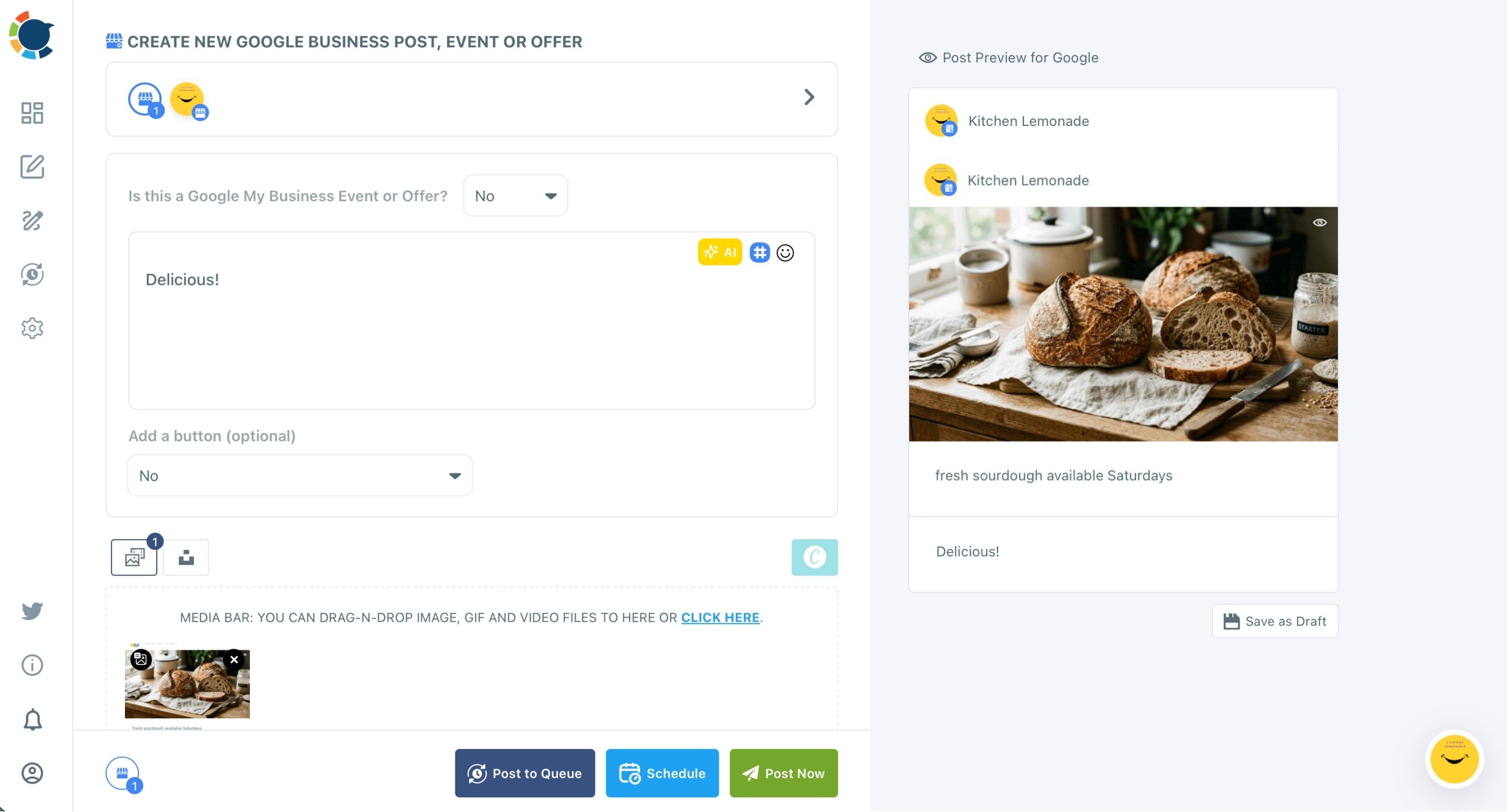
The preview panel shows the post as a searcher would see it on Google, which is the fastest way to catch a missing photo or a weak first line before it goes live. Text runs up to 1,500 characters, and a post can carry up to 10 images of 5 MB each.
Photos matter more when there is no storefront to show. A clear shot of finished work, a clean van or a before-and-after (with the customer's permission) does the job a shop window would.
Add alt text to each image in the composer; Google Business Profile is one of the platforms in Circleboom Publish that supports it, and it helps the photo appear in Google Image search.
Writing is the slow part for most owner-operators, especially the ones who are excellent at the trade and have never had to write marketing copy.
The AI Google Business post generator drafts a post from a one-line instruction. An example is "explain why gutters overflow in autumn." The result still needs a fact check, since it will sit on a public listing.
To set up that writing and scheduling routine, start scheduling posts for a hidden-address Google My Business listing.
How a service-area profile keeps posting without daily work
A service-area profile keeps posting through scheduling and the Queue, which publish on dates set in advance. The owner is usually out on jobs, so the work has to happen in one sitting and run on its own after that.
The scheduler for Google My Business handles the first half. Click Schedule in the composer, pick a date, and either type a time or take a suggested slot based on when that profile's customers are active. With one profile connected, the composer selects it automatically.
The Queue handles the second half. Recurring day-and-time slots are set once per profile, and every post sent with Post to Queue drops into the next open slot. Add Best Times to Post fills those slots with the profile's suggested times.
A common tip is about six posts a week, which only feels realistic when a week of posts is written in one session.
For businesses that already run a blog, an RSS feed can post each new article to the profile automatically. RSS-sourced posts are not reviewed by a person before they publish unless the rule is paused, so the feed's content should be checked first.
Checking the plan without opening Google
The Outbox shows everything scheduled in a List View grouped by day or a Calendar View by week or month. Empty days stand out there before the profile goes quiet.
Unfinished posts can wait in Drafts, and Sent Items lists what already went out, with Share Again to reuse a post as a starting point.
I check the Calendar View before every new batch, because gaps are easier to see on a grid than in a list.
Google's own Business Profile tools can also schedule a post and share it across several profiles you manage, so the choice between them is about workflow. The roundup of the best tools to schedule Google My Business posts compares the options.
Circleboom Publish adds RSS automation from your own blog, UTM-tagged button links and Canva designs sized for the profile.
Your service-area checklist for Google Business Profile
Hiding the address is one Google setting; staying findable is a weekly habit. In order:
- Confirm you are a service-area business, not a hybrid, before switching anything off.
- Turn off "Show business address to customers" and add up to 20 named service areas.
- Pick the primary category and subcategories that match each service.
- Write a batch of Standard, Event and Offer posts about problems your customers search.
- Schedule them at suggested times or send them to the Queue, then repeat every couple of weeks.
→ Set up posting for a Google listing with a hidden address
What People Ask about service-area listings on Google
Which button should a service-area business put on its Google posts?
Use Call Now for urgent, nearby requests and Book for anything that waits for a time slot. Circleboom Publish offers six buttons on Standard and Event posts (Call Now, Learn More, Book, Sign Up, Order Online and Buy), while Offer posts use a coupon code and redeem link instead.
Can I post the same update to my Google listing more than once?
Avoid exact repeats. Google's systems favour fresh, original content, so rewrite a returning Event or Offer with the AI writer in Circleboom Publish and add what is new this time.