The content calendar ideas that hold up all year are twelve monthly themes, each turned into four posts you write in one sitting and schedule weeks ahead. Below you get the twelve themes, the four post angles that fill each one, and the exact steps to put a whole month on the calendar today.
What a year of themes looks like.
• One theme for each month.
• Four post angles per theme.
• Circleboom Publish schedules them weeks ahead.
Pick the month you are in and start there. Batch-schedule a month of content calendar ideas in one sitting.
Why a monthly theme beats a list of daily holidays
Most lists of content calendar ideas are lists of days: a national pizza day, a world emoji day, a holiday for every date of the year. They look useful, but a list of days does not tell you what to post, how many posts to make or when to make them.
So the calendar stays empty until the morning of the post, and you end up posting whatever comes to mind that day.
A monthly theme fixes the decision once.
You choose one subject for the month, plan a small set of posts around it, and every week already knows what it is about. The observance days still fit, but as material inside the theme rather than as 365 separate deadlines.
Themes also give your followers a reason to keep watching. A month built around one subject reads like a series, and a series gives people a reason to come back for the next part.
A theme is a decision you make once, not a question you answer every morning.
The other half of the problem is timing. Ideas written in a notebook never post themselves. Once a theme is chosen, you can schedule your content calendar ideas ahead and stop thinking about them until the posts go live.
Circleboom Publish schedules one post to Instagram, Facebook, LinkedIn, X and six more networks from a single composer, so a theme planned once reaches every account you run.
How far ahead can you schedule a themed post?
As far ahead as you like. In Circleboom Publish, the Schedule button works the same for ten minutes from now or ten months from now, so a December theme can be scheduled in January if the posts are ready.
That changes how you can plan a year. You do not need to wait for a season to write for it; you need the season's posts written.
For the steady weekly rhythm, the Queue does the timing for you.
Each account gets its own recurring time slots in Time and Queue Settings, and Post to Queue drops a new post into the next open slot. "Add Best Times to Post" fills those slots with times computed from that account's own followers' activity.
The Queue is the setup behind most ways to automate social media posts on a fixed weekly pattern.
Posts that are not final yet can wait as drafts. Save as Draft keeps the selected accounts, the text and the media together, so a half-written theme is still there when you come back to finish it.
Turn each monthly theme into four scheduled posts
Most content calendar ideas stop at the theme. The step that makes a theme schedulable is splitting it into four posts, one per week, each with a different job.
The four post angles every theme needs
Every month uses the same four angles:
- Teach: a tip, a how-to or a fact related to the theme.
- Show: your product, team or process, tied to the theme.
- Ask: a question, poll or prompt that invites replies.
- Offer: a promotion, a resource or a clear next step.
Four angles per month means 48 planned posts a year per platform, and none of them depends on a good idea arriving on the day.
Map each angle to one weekly slot in the Queue: teach in week one, show in week two, ask in week three, offer in week four.
We put the offer last on purpose. You give value first, earn attention second, start a conversation third and only then ask for something.
Twelve monthly themes with their post angles
| Month | Theme | Four post angles |
|---|---|---|
| January | Fresh starts | Goal tip, your plan, their goal, starter offer |
| February | Customer love | Care tip, team favorites, ask for stories, thank-you deal |
| March | Spring cleaning | Declutter tip, before and after, worst habit, refresh bundle |
| April | Arts and sports | Event fact, team picks, who they back, game-day offer |
| May | Mothers and mentors | Gift guide, mentor story, tag someone, gift set |
| June | Summer kickoff | Season checklist, summer setup, plans poll, early-bird deal |
| July | Midyear review | Lesson learned, half-year wins, their wins, midyear sale |
| August | Back to school | Study tip, desk tour, best teacher, student discount |
| September | New routines | Routine tip, a day in your work, their routine, habit kit |
| October | Autumn and Halloween | Season fact, costume reveal, favorite treat, themed promo |
| November | Gratitude and deals | Thank-you post, customer shout-out, what they are thankful for, holiday deal |
| December | Holidays and year in review | Gift tip, year in numbers, best post of the year, last call offer |
For a fact to post inside each month's theme, the U.S. Census Bureau's Stats for Stories calendar pairs observances, holidays and anniversaries with a statistic, which makes a ready-made "teach" post.
Winter themes from January to March
Winter content leans on fresh starts and indoor life. January's goal posts work well on LinkedIn and Facebook, while Instagram needs the visual side of the season.
For captions that match the cold months, borrow from these winter captions for Instagram and adapt them to your "show" posts.
March's spring cleaning theme is easy to make about any business: what you removed, simplified or fixed.
Spring themes from April to June
April is a busy month for events, which gives the "teach" and "ask" posts something timely to hang on. The list of April arts and sports events for Twitter marketers shows how to build posts around events your audience already follows.
May belongs to mothers, mentors and gifts. The tags and phrases in these Mother's Day hashtag and keyword suggestions slot straight into the "ask" post that invites followers to tag someone.
June opens the summer, so its offer post can run early and set up July.
Summer themes from July to September
July sits in the middle of the year, which makes it the natural month to look back. A half-year review post is one of the few posts that works for every business.
Summer events still matter, though. One event per week can carry a month of X posts, as keeping up with July events on Twitter shows.
August and September are about returning to routine, which suits teaching posts and behind-the-scenes content about how your work runs.
Autumn themes from October to December
The last quarter carries the most commercial weight, so plan it first. October's seasonal theme is light and visual, which suits Instagram and Facebook.
November mixes gratitude with the biggest shopping weeks of the year. These holiday content ideas give the "show" and "offer" posts plenty of material.
December closes the year, and its review posts are worth writing early. The timing advice in December windows of opportunity helps you place each post before the holiday quiet sets in.
How Circleboom Publish schedules a year of themed posts
Circleboom Publish is a social media scheduler that sends one post to any mix of connected accounts across X, Instagram, Facebook, LinkedIn, Pinterest, Threads, Bluesky, TikTok, YouTube and Google Business Profile in one send. Native schedulers post to one account on one platform at a time.
That difference decides how long a monthly theme takes. Say you run 7 accounts across Instagram, Pinterest, LinkedIn and Bluesky, and you have the month's 4 posts ready. Posting natively, that is 4 posts × 7 accounts, or 28 separate publishes.
In Circleboom Publish, the same month is 4 sends and about 10 minutes.
You write each post once, select all seven accounts, and schedule it. Share Groups save a recurring bundle of accounts, such as one client's or one branch's accounts, so the selection is one click every month.
For posts that go to X, Circleboom is an official X Enterprise developer. Your scheduled X posts go out through access X itself has approved, with no workarounds that put the account at risk.
Which platforms should carry each monthly theme
Choose platforms by where your audience is. According to Pew Research Center's fact sheet on Americans' use of social media, 70% of U.S. adults use Facebook.
Instagram reaches 51% and Pinterest 37%, which is why visual content calendar ideas deserve their Instagram and Pinterest versions.
When the month's posts are written, you can batch-create a month of themed posts and schedule them in the same sitting.
One sitting, one month: a full batch of themed Facebook posts scheduled at once instead of one by one.
How to schedule a month of content calendar ideas in one sitting
The process, step by step, for one month's theme.
Set up your accounts and the weekly rhythm
- Log in to Circleboom Publish and connect the accounts the theme should reach.

- Open Time and Queue Settings under Settings and click Add Best Times to Post, so each account has recurring slots for the four weekly posts.
Write the month's four posts
- Click the pencil icon in the sidebar and choose Create New Post on All Platforms.
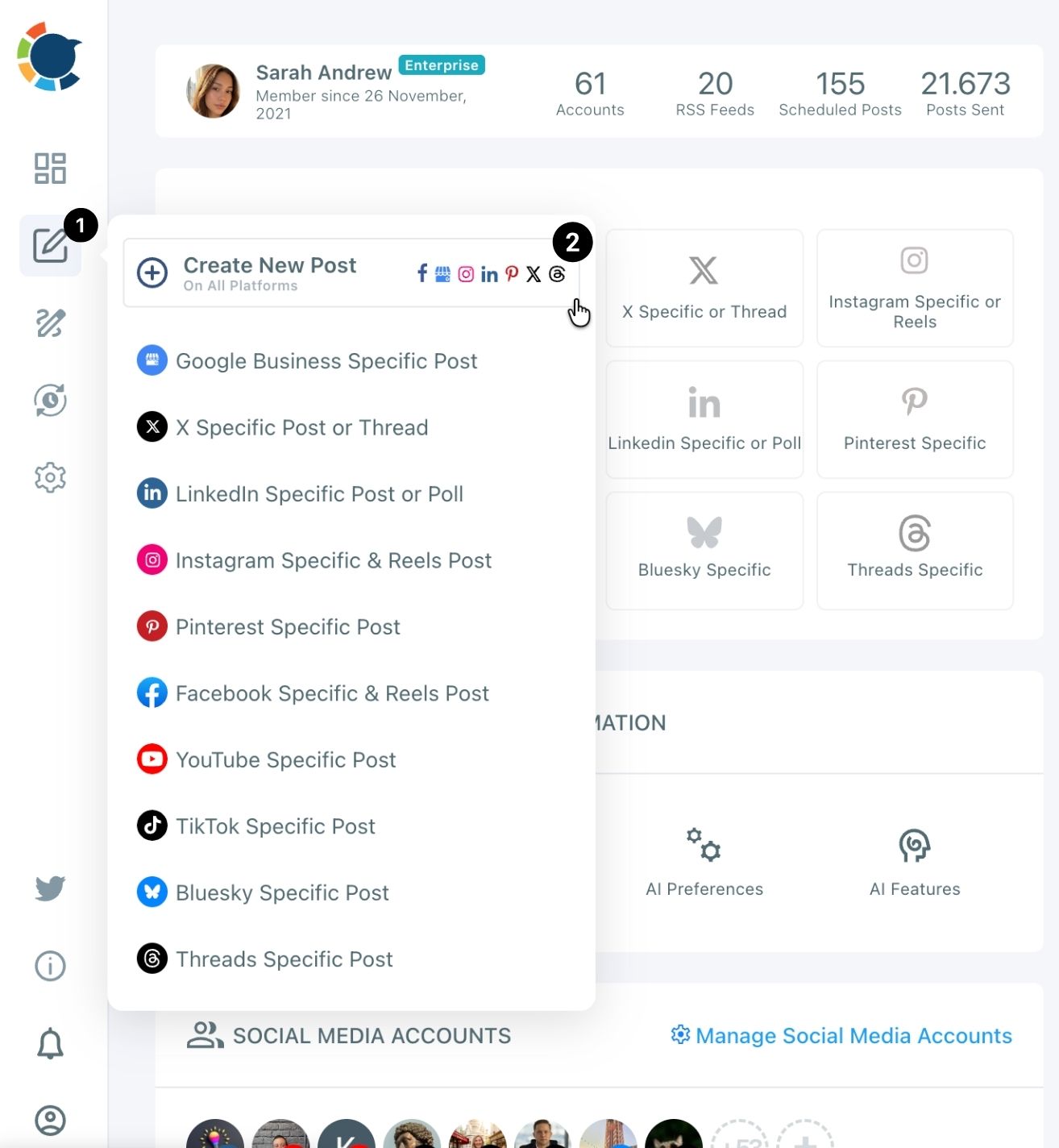
- Select the accounts, by platform icon, by Share Group or by search.
- Write the "teach" post in the text field, or click the AI button and describe it. If X is selected, tell the AI "max 280 characters", because it does not apply platform limits on its own.
- Add media from your device, Unsplash, Giphy, Google Photos, Canva or the AI Carousel Generator, then check every network's tab in the Post Preview. Instagram needs an image or video, and X and Bluesky take up to 4 images.
Schedule the month and check the calendar
- Click Schedule, pick the date and one of the times under "Pick your best post time", or click Post to Queue to fill the next open slot. Repeat steps 3 to 7 for the show, ask and offer posts.
- Open the Outbox Calendar View and switch to Month. Any empty week shows up at once, and the "+" button on an empty day opens "Create new post for [Date]" to fill it.
That order keeps the month honest: the slots exist before the posts, so every post has a place to land, and the calendar check comes last, when a thin week is still easy to fix.
What to post on days between monthly themes
Fill the gaps with chosen outside articles. Four themed posts a month cover one post a week, but text-first platforms such as X, Facebook, LinkedIn, Bluesky and Threads reward accounts that show up more often than that.
Discover Articles in Circleboom Publish lets you pick a topic, browse fresh articles and add the best ones to the Queue in one click. That keeps the days between themed posts active without you writing anything new.
Article curation works best when the topics match your monthly theme, so the filler posts still feel part of the month.
Once a source proves reliable, connect it as an RSS feed. RSS posting covers X, Facebook, LinkedIn, Google Business Profile, Bluesky and Threads, and it does not post to Instagram, TikTok, YouTube or Pinterest, so the visual platforms keep their four themed posts.
At the end of each month, check which angle earned the most replies and clicks in post analytics, and give that angle more room next year.
Your yearly content calendar checklist
Run these checks before the next month starts:
- Pick the month's theme from the table and write its four angles in one line.
- Confirm every account has Queue slots filled with its best times.
- Write all four posts in one sitting and check each network's preview.
- Schedule them, then scan the Month view for empty weeks.
- Add outside articles or an RSS feed for the days in between.
Do that twelve times and the year runs on content calendar ideas you chose in advance instead of last-minute guesses. Each month takes one sitting, and the rest of the month is free for replies, analytics and the next idea.
→ Turn this year's content calendar ideas into scheduled posts
Questions about yearly content themes
Can I reuse last year's themed posts?
Yes, but refresh them first. Share Again in Sent Items copies a published post into an editable version, and the AI writer can rephrase it, because platforms can limit the reach of repeated identical posts. On X, Circleboom blocks the same tweet from going out again within a week, and social media reposting covers the full reuse workflow.
Do I need design skills for themed visuals?
No. The Circleboom Publish composer has Canva, Unsplash and the AI Carousel Generator in its media bar, so a seasonal image or carousel can be made without leaving the post. Ready-made post templates give each month a consistent look.
Does Circleboom Publish include a holiday calendar?
No. The themes come from your own plan, such as the twelve in this guide, and Circleboom Publish schedules the posts you build from them. A public observance calendar like the Census Bureau's gives you the dates to plan around.