X API pricing now runs on pay-per-usage credits: every post read, every user profile read and every post created is billed one by one, so 100,000 tweets alone cost $500. Circleboom is an Official X Enterprise Developer, which means it works with the same official X data, and the same 100,000 tweets cost about 20% less with Circleboom. The same logic applies to followers, account data and publishing: Circleboom gives you finished tools for each, so you never touch keys, endpoints or rate limits.
The new X developer page has a friendly slider. Drag it to 50k posts and a green number appears: $250. It feels small for a moment.
Then the real project starts. A competitor study needs a year of tweets, plus the profiles of everyone who wrote them. An audience audit needs a follower list with real data on every account. A content plan needs posts going out every day. Each of those is a separate line on the credit table, and none of the numbers include the hours spent on keys, pagination and a script that breaks the first time a field comes back empty.
The X API is a great product for developers who are building software. For someone who just needs answers from X data, it is a long road to a spreadsheet. With Circleboom Twitter, you can search tweets, export followers, analyze any account and schedule posts on X from one dashboard, using the same official X data at a lower cost.
What the X API pricing page actually charges
X moved its API to a credit model. You buy credits, and each request or resource draws from them. Here is the credit consumption table from the official X developer pricing page, with every slider at 50k:
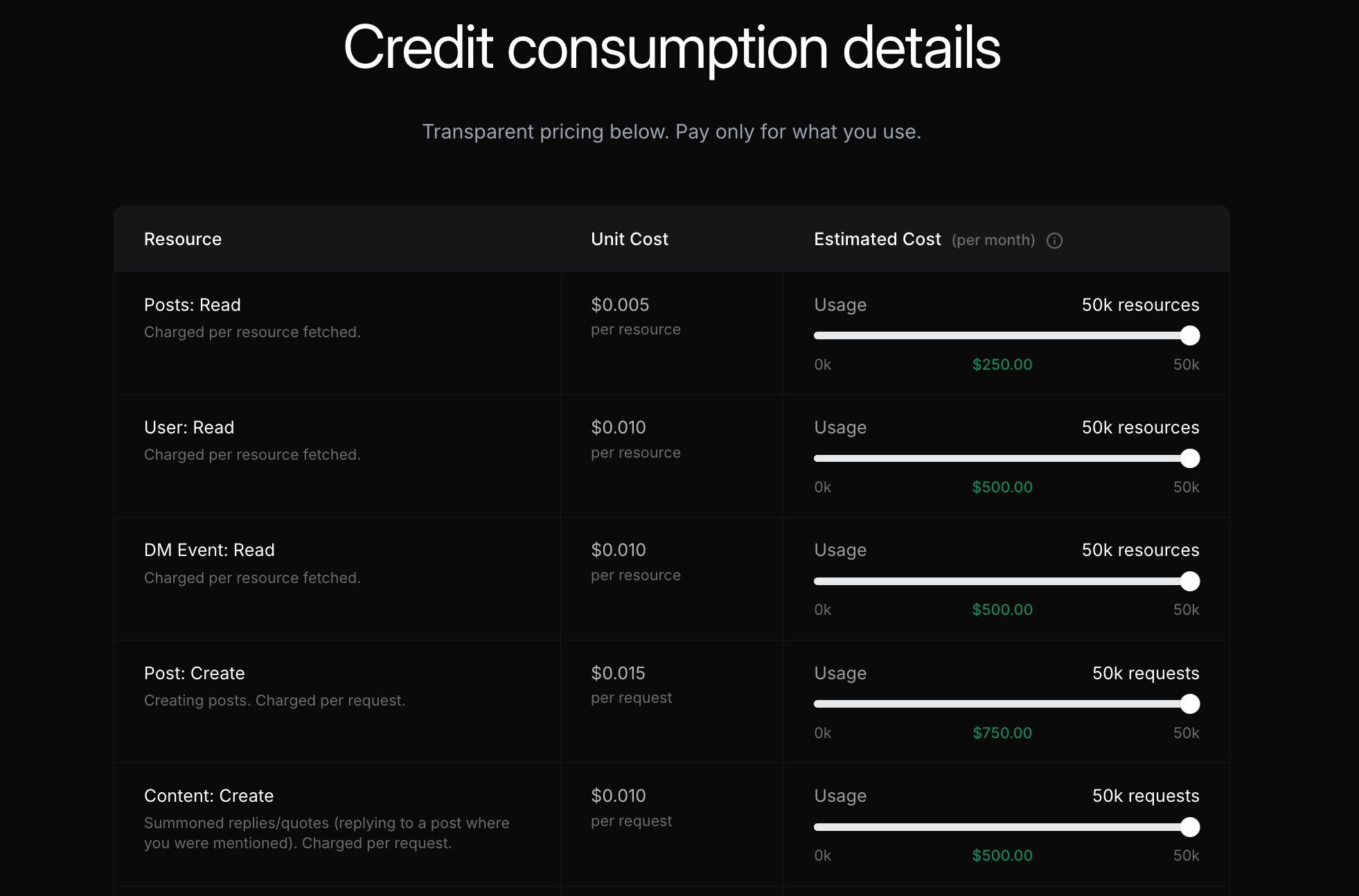
Read line by line, it looks like this:
- Posts: Read costs $0.005 per post fetched, so 50,000 posts cost $250
- User: Read costs $0.010 per user profile fetched, so 50,000 profiles cost $500
- DM Event: Read costs $0.010 per DM event fetched
- Post: Create costs $0.015 per post you publish, so 50,000 posts cost $750
- Content: Create costs $0.010 per summoned reply or quote
The full table in X’s API documentation goes further. These lines matter for everyday X management:
- Following/Followers: Read costs $0.010 per account in a follower or following list
- Post: Create with a URL costs $0.200, so a post with a link costs more than 13 times a plain one
- User Interaction: Create costs $0.015 per request, for actions like following an account
- Interaction: Delete costs $0.010 per request, for undoing an interaction such as an unfollow or an unlike
- Content: Manage costs $0.005 per request, for deleting or hiding posts
- Analytics: Read costs $0.005 per resource
- Trend: Read costs $0.010 per trend
- List: Create costs $0.010 per list, and List: Manage $0.005 per update
Most real projects touch more than one line. Pulling tweets and then the accounts behind them means paying for posts and users. A tool that reads data and then publishes adds the create lines on top.
These are X’s published rates at the time of writing. Check the X developer pricing page for the current numbers before you plan a big pull.
Same official X data, lower cost with Circleboom
The comparison only works if the data is the same. It is.
Circleboom is listed in X’s Enterprise customer directory as an Official X Enterprise Developer. Its search, export, analytics and publishing tools all work through official X APIs. No scraping, no shared passwords, no unofficial endpoints. The tweets, profiles and metrics you see in Circleboom are the same real X records a developer would get from their own API calls.
Tweets are the clearest example of the price gap:
X API, 100,000 tweets: about $500 in credits, plus your own code to search, store, filter and export them.
Circleboom, 100,000 tweets: about 20% less than the X API, with the search, filters, account view and CSV export already built.
Same official X records, about 20% less for 100,000 tweets, and no code to write.
That is roughly 20 percent less for the raw data alone. Follower lists show an even bigger gap: exporting another account’s followers with Circleboom comes out 55 to 73 percent below the X API’s $0.010 per account, depending on the size of the list. And many everyday actions that the X API bills one by one, such as searching for accounts, following, unfollowing and reading your analytics, are simply part of a Circleboom plan. The bigger saving is time. Nobody on your team needs to read API docs to answer “who complained about our competitor last spring?” or “how many of our followers are fake?”
One dashboard instead of a dozen API lines
Circleboom Twitter is a full X management platform built on top of X’s official data, so each line of the credit table already has a finished tool waiting for it:
- Posts: Read becomes Historical Tweet Search, Real-time Tweet Search and Export Tweets
- User: Read becomes Live X Account Search, Deep X Account Search, Find Influencers and X Account Analysis
- Following/Followers: Read becomes Followers / Following Search, Export Followers or Following and follower quality views like Fake/Bot Followers
- User Interaction: Create and Interaction: Delete become bulk follow and unfollow, Mass Block and the delete tools for tweets and likes
- Analytics: Read becomes Post Analytics, and Trend: Read becomes Inspiration
- Post: Create becomes X Post Planner, Bulk Schedule and Auto Retweet
- Every list comes with filters and buttons to follow, add to an X List or export, so the data turns into action without leaving the page
With Circleboom, you get the results of the X API on X without the engineering in between.
What you can do with Circleboom instead of the X API
Search past and live tweets
The most common reason people buy X API credits is tweet search. In Circleboom’s Advanced X Search menu, two tools cover it.
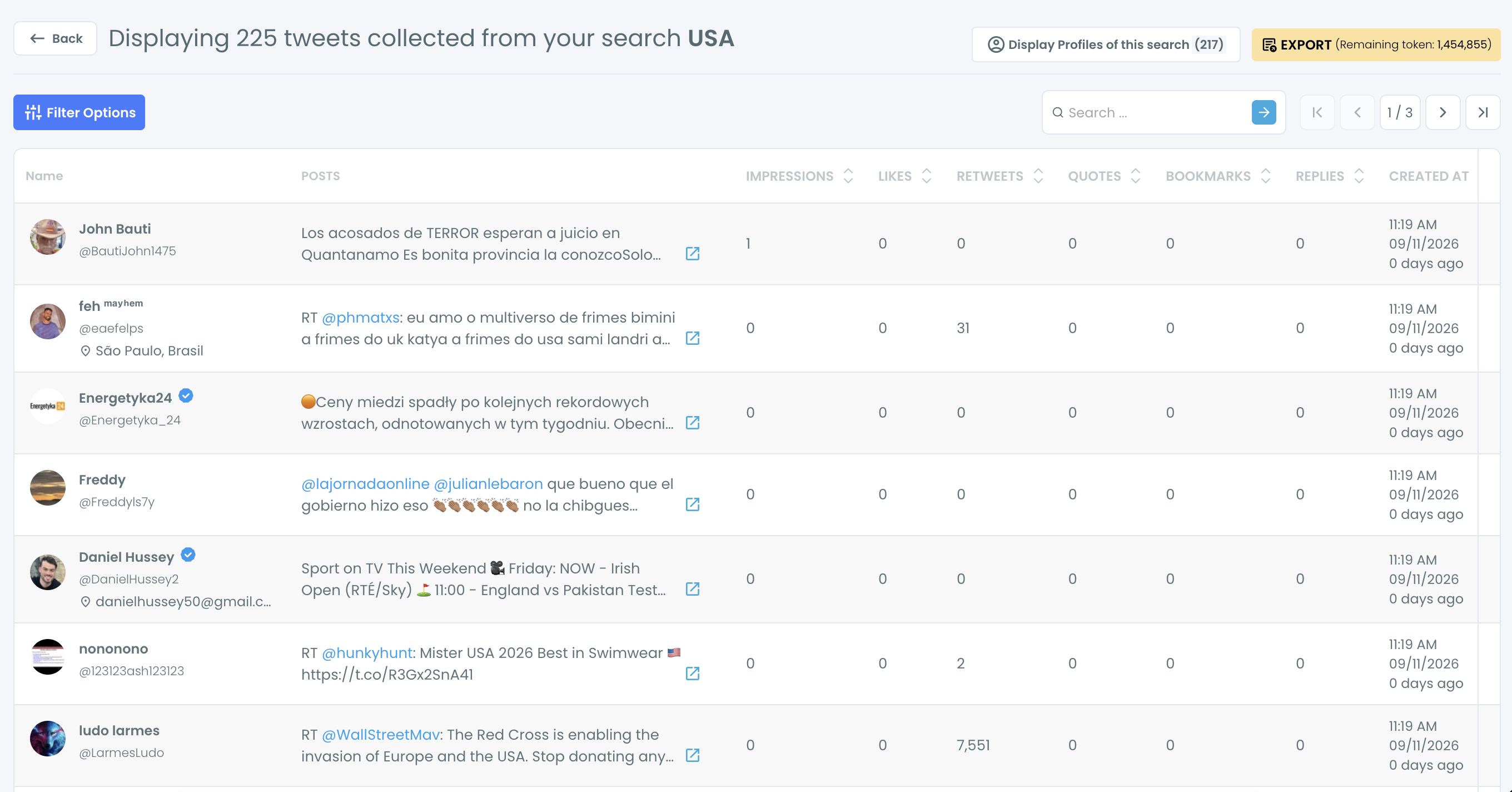
Historical Tweet Search finds public tweets from a past window. You describe the tweets in plain language, for example “people unhappy with their CRM”, pick Last 30, 60 or 90 Days, Last 1 Year or a custom range, and choose how many tweets to collect. The result opens as a tweet list with impressions, likes, retweets, quotes, bookmarks and replies, and one click switches it to the unique accounts behind those tweets.
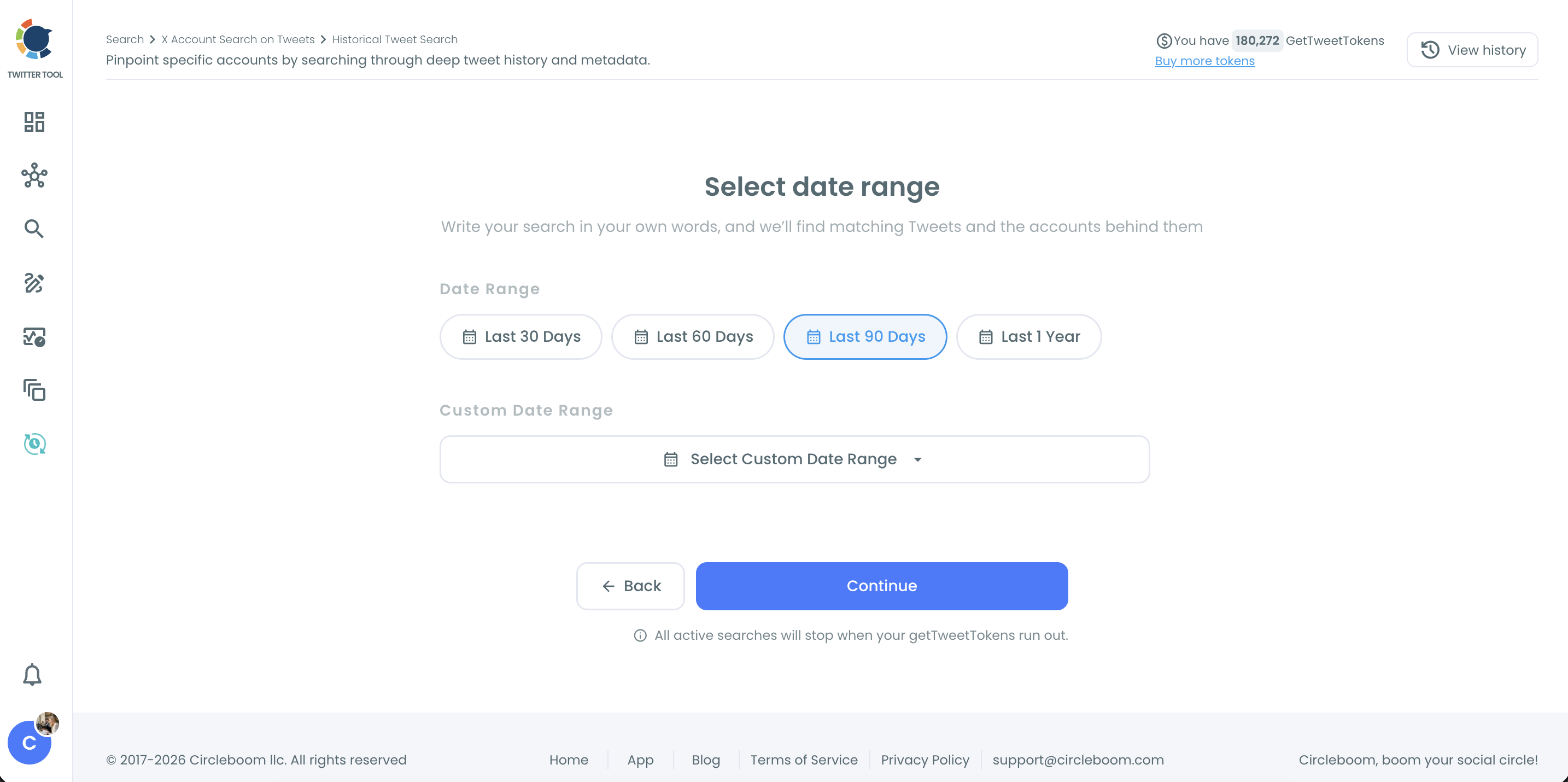
Real-time Tweet Search does the same from a start date onward. It keeps collecting matching tweets as they are posted, which makes it the right tool for a product launch, a live event or a competitor’s bad day.
Export tweets and read post performance
If you need one account’s timeline rather than a keyword search, Export Tweets downloads the recent tweets of any public X account as a CSV, with dates and engagement numbers on every row. Filters for date, engagement, post type, language and keyword can be applied first, so the file holds exactly the segment you need.
For your own account, Post Analytics turns the same post data into charts for impressions, likes, reposts and other engagement over time. On the X API, Analytics: Read alone costs $0.005 per post, so refreshing the numbers for 3,200 posts is a new $16 charge every time, before a single chart exists. That is the dashboard a developer would otherwise have to build on top of Posts: Read.
Get followers, following and account data
User: Read is the most expensive read line on the X API pricing table, at $0.010 per profile. In Circleboom, Followers / Following Search lists the followers or following of any public account in one filterable view, and Export Followers or Following downloads that list as a CSV.
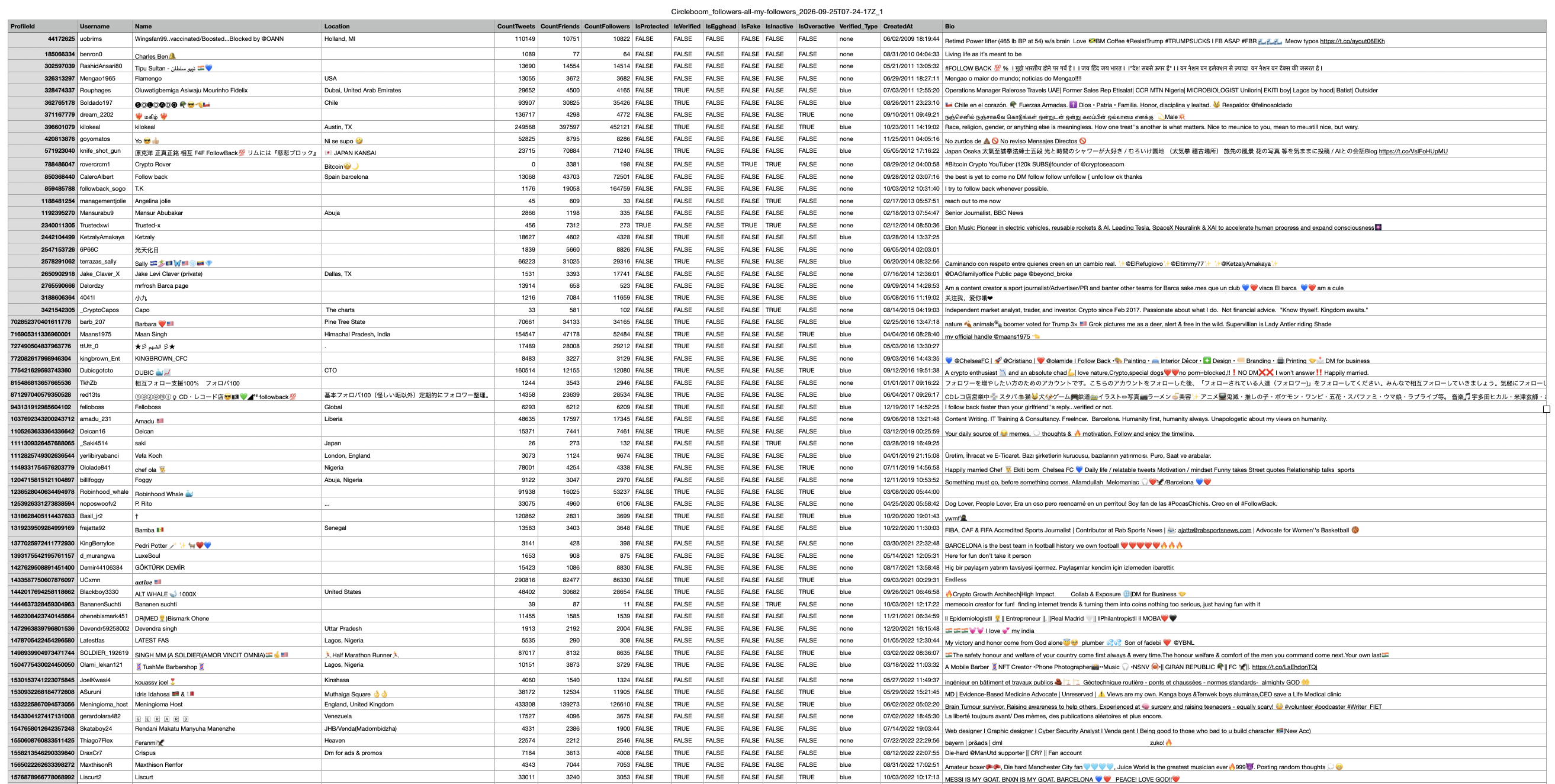
The export is more than raw profiles. Each row carries quality flags like verified, egghead, fake and inactive, so the analysis is already started when the file opens.
When you want the whole picture of one account, X Account Analysis builds a dated report on any X account, yours or someone else’s: audience quality, demographics, posting behavior, engagement, reach and top content. For your own audience, Fake/Bot Followers isolates the suspicious accounts in your follower list so you can review them and clean up.
Find accounts, follow and clean up in bulk
Account discovery is billed per profile on the X API. A Deep X Account Search can list up to 5,000 accounts for one keyword, which would be 5,000 × $0.010 = $50 in User: Read charges for a single search. In Circleboom, searches like this come with your plan.
Acting on those accounts is billed again. Following costs $0.015 per account and unfollowing $0.010 on the X API. Circleboom’s bulk follow and Not Following Back tools process up to 400 follows and 800 unfollows a day as an account-protection safeguard, and queued actions continue automatically the next day. At that pace, a month of follows and unfollows would be about $420 in X API credits. In Circleboom it is part of the plan.
The same goes for blocking spam accounts in bulk with Mass Block or organizing accounts with the X List Manager. On the X API every block, list and list update is a separate request.
Searching, following, unfollowing and blocking are separate billed requests on the X API. In a Circleboom plan, they are features you simply use.
Publish and schedule posts
Post: Create costs $0.015 per post and $0.200 when the post contains a link, and that is before you build a scheduler around it. X Post Planner is Circleboom’s writing and scheduling workspace: you draft posts and threads, add media, use AI tools and schedule them for later.
For volume, Bulk Schedule uploads a CSV of posts with their posting times and schedules them in one go. You get the publishing side of the X API with a calendar, a queue and AI help instead of a cron job.
Why X API pricing is only part of the real cost
The credit table shows what X charges. It does not show what you spend around it.
To pull data through the API, someone has to create a developer app, manage keys, write queries in X’s operator syntax, handle pagination, respect rate limits, retry failed requests and store everything somewhere. Then comes the part you actually wanted: turning raw JSON into a list you can read.
Every retry and every test run is also billed. A buggy script that fetches the same page twice pays for it twice.
Combining lines adds up fast, too. A tweet search gives you tweets. If you also want clean, deduplicated profiles behind them, that is extra code and, depending on how you fetch them, extra User: Read charges. Circleboom builds the account view for every tweet search automatically and shows quality data next to each profile.
If you have ever tried searching old tweets on X by hand, you already know native search is not the answer either. Circleboom sits in the middle: official X data like the API, a finished interface like an app.
What happens when you pay for the API and only need answers
Most X API projects are not software products. They are questions.
- A brand wants every mention of its name over the past year for a report. That is brand monitoring, and Historical Tweet Search answers it with a date range and a keyword.
- A sales team wants people who complained about a competitor last quarter. That is competitor research, and the profiles view turns those tweets into a prospect list.
- A researcher needs a clean Twitter dataset for download for sentiment analysis. Export gives them a CSV from official X records.
- A marketer wants to export Twitter followers to a spreadsheet to study a competitor’s audience. Export Followers or Following does it without a single User: Read call of their own.
- A creator wants a steady posting rhythm. X Post Planner and Bulk Schedule handle it without a posting script.
Paying full X API pricing for these questions means paying more per record and then paying again in setup time. With Circleboom Twitter, you can answer them on X directly, at a lower rate and with the result already in a table.
Scraping-based tools look cheaper still, but they can miss records or return incomplete datasets when a page fails to load. We covered that side in our look at scraping all of a person’s tweets and in the story of extracting followers without paying for Twitter’s API. For a step-by-step take on tweet exports, see how to export all tweets of an X user to Excel or CSV.
FAQ
How much does the X API cost?
On X’s pay-per-usage pricing, reading a post costs $0.005, reading a user profile costs $0.010 and creating a post costs $0.015. That puts 100,000 tweets at $500 and 50,000 user profiles at $500. Check the official pricing page for current rates.
Is Circleboom’s data the same as the X API data?
Yes. Circleboom is an Official X Enterprise Developer and works through official X APIs. The tweets, profiles and engagement numbers come from real X records, not from scraping.
How is Circleboom cheaper than X API pricing?
As an Enterprise customer, Circleboom works with X data at scale and passes it on inside its plans. For 100,000 tweets, the cost works out to about 20% less on Circleboom than the $500 in X API credits, and the search, filters and export are already included.
Do I need coding skills to use Circleboom instead of the X API?
No. You type a keyword, a username or a plain-language request, and Circleboom returns a filterable list or report. There are no keys, endpoints or query operators to manage, although Historical and Real-time Tweet Search have an advanced query mode if you want it.
Can Circleboom export followers like the X API?
Yes. Followers / Following Search lists the followers or following of any public account, and Export Followers or Following downloads them as a CSV with profile data and quality flags on each row.
Can I publish and schedule posts with Circleboom instead of the API?
Yes. X Post Planner lets you write, schedule and publish posts and threads, and Bulk Schedule uploads many posts at once from a CSV file. You get a calendar and AI writing help instead of a posting script.
Final thoughts
The X API pricing slider makes data look cheap until you add up the posts, users and requests a real project needs, plus the code to read them. For developers building a product, the API is the right tool. For everyone else, it means paying more per record and doing engineering work to answer a marketing or research question.
Circleboom gets you the same official X data for less and hands it back as tweets, accounts, reports and schedules you can act on straight away. Start with Circleboom Twitter and run your first search, export or report on X today: